
Computer program: definition, parts, history, and common examples
Overview of what a computer program is, how programs are written and stored, typical types and examples, history, development practices, execution, and security concerns.
A computer program is a structured set of instructions that directs a computing device how to perform tasks. In practical terms it is a sequence of statements or commands written in a form that people can author and machines can execute. Programs may be simple scripts that perform a single calculation or complex systems that coordinate hardware resources, user interfaces, data storage and network communication. In modern computing the distinction between program, application and service often blurs: many programs are components of larger systems.
Image gallery
10 Images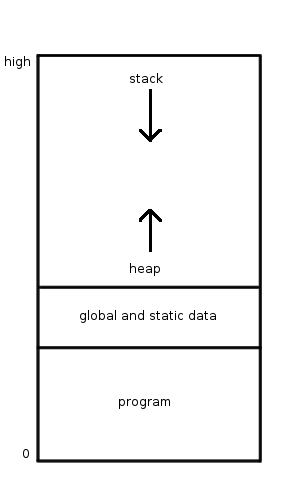


Core characteristics
Programs exist in two complementary forms: human-readable source code and a machine-readable representation. The source code is written in a programming language, such as BASIC, C or Java, and expresses algorithms, control flow and data structures. Tools such as a compiler or interpreter transform or run that source code so the processor can perform the specified operations. The executed representation may be native machine code or bytecode run on a virtual machine.
Types and common examples
- Operating systems manage hardware and provide services used by other programs.
- Web browsers (for example, Firefox or Chrome) render content from the Internet and host web applications.
- Office suites bundle applications for word processing, spreadsheets and presentations.
- Other examples include mobile apps, video games, scientific simulation software and embedded control code inside devices such as routers or appliances.
History and the stored‑program concept
The idea that a computer could store instructions in the same memory used for data — the stored‑program concept — formed a foundation for modern software. Early theorists and designers such as John von Neumann articulated key principles for program organization in the mid‑20th century. Hardware projects that implemented these ideas after World War II influenced subsequent architectures and software practices. Over time programming moved from direct machine coding to higher level abstractions and richer development environments.
How programs are created and executed
A program is typically saved as a file on persistent storage and loaded into memory when executed. At runtime the computer fetches and processes the instruction sequence: some environments use an interpreter to read and execute instructions directly, others run compiled machine instructions. Programs often rely on libraries, runtime environments or services provided by the operating system, and may interact with users, other programs and network resources.
Programming approaches and practices
Software development includes designing algorithms, writing source code, testing and maintenance. Common paradigms include procedural, object‑oriented and functional programming, each offering different ways to structure code and reason about behavior. Modern teams use version control, automated testing, continuous integration and package management to coordinate work and maintain quality. The role of a programmer or software engineer covers design, implementation and long‑term maintenance.
Security, misuse and licensing
Programs can be beneficial or harmful. Malicious software, or malware, covers categories such as spyware, viruses and ransomware, which aim to steal, corrupt or deny access to data. Software is also published under different licensing models: proprietary, open source and permissive licenses affect how programs may be used, modified and distributed. Proper security practices, patching and code review reduce exposure to vulnerabilities.
Special contexts and future directions
Programs run in many environments: on personal computers, servers, mobile devices, embedded controllers and cloud platforms. Embedded software often has strict performance and reliability requirements, while cloud services emphasize scalability and distributed design. Emerging trends include increased use of managed runtime environments, domain‑specific languages, formal verification for critical code and development of tools to improve developer productivity.
Related concept pages and example links: instruction, computer, von Neumann, origin, operating system, browser, Firefox, Chrome, Internet, office suite, documents, spreadsheets, file, programmer, binary, machine code, languages, BASIC, C, Java, compiler, malware, spyware, virus, ransomware.
Related articles
Author
AlegsaOnline.com Computer program: definition, parts, history, and common examples Leandro Alegsa
URL: https://en.alegsaonline.com/art/22329