
iOS 11: features, history, reception, and impact
Overview of iOS 11, Apple’s 2017 major iOS release: key features, iPad additions, compatibility changes, reception, adoption rates, and its place in Apple’s software evolution.
Overview
iOS 11 is the eleventh major release of iOS, Apple’s mobile operating system, developed by Apple Inc.. Announced at the company’s Worldwide Developers Conference on June 5, 2017, it succeeded iOS 10 and arrived to the public as a free update on September 19, 2017. The release combined visual refinements with functional changes across the platform: redesigned system interfaces, expanded iPad productivity features, new developer tools for immersive apps, and under-the-hood updates for media and file handling. iOS 11 was positioned both as an iterative modernization of the iPhone experience and as a step toward treating the tablet as a more capable computing device.
Image gallery
7 Images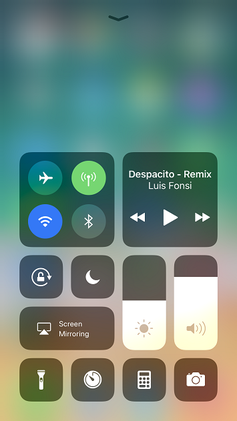



Key features and user-facing changes
iOS 11 introduced a range of changes to system apps and interfaces. Prominent additions included:
- Lock screen and notifications: Notifications and the lock screen were unified, allowing users to view recent alerts directly from the lock screen with fewer gestures.
- Control Center: The Control Center was consolidated into a single page and made customizable, with deeper Quick Action options available through pressure touch gestures on supported devices.
- App Store redesign: The App Store was visually reworked to emphasize editorial content, daily highlights, and app stories rather than relying solely on charts and lists.
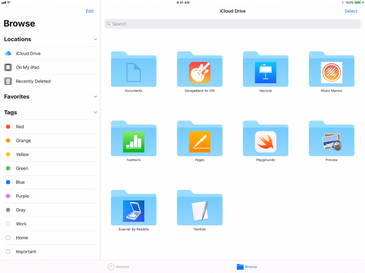
- Files app: A new Files app provided a central place to browse documents stored locally and in cloud services, simplifying file management across apps and accounts.
- Siri improvements: Siri gained a more natural voice, limited on-device learning to personalize suggestions, and basic translation capabilities for a few languages.
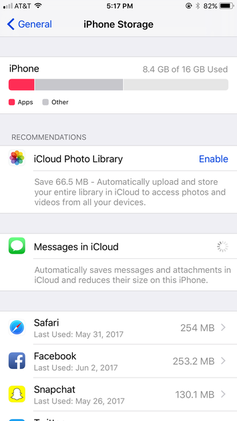
- Media and camera: New photo formats (HEIF/HEVC) reduced storage for images and video on supported hardware, while camera settings received additional controls for portrait and Live Photo effects.
- Screen recording and drag-and-drop: Built-in screen recording and partial drag-and-drop features expanded utility for content sharing and multitasking.
- Augmented reality: Apple introduced ARKit, a development framework enabling apps to place virtual objects in real-world scenes, opening a broad new area for third-party developers and creative applications in augmented reality.
- Payments and Messages: iOS 11 added person-to-person payments via Apple Pay in a later point release and laid groundwork for Messages sync with macOS through iCloud.
iPad-specific enhancements
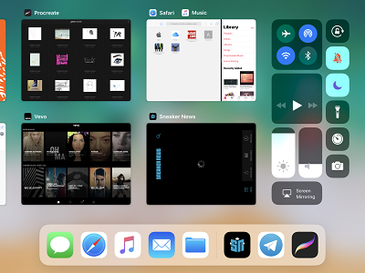
Apple gave the iPad several features intended to boost productivity. An always-accessible app dock allowed quick app switching, cross-app drag-and-drop enabled moving text, images and files between apps, and an improved multitasking interface made it easier to view multiple apps simultaneously. Combined, these changes aimed to narrow the gap between tablet and laptop-style workflows and encouraged developers to adapt their apps to richer multitasking scenarios.
System compatibility and developer changes
iOS 11 tightened compatibility and modernized the platform for developers. One of the most consequential system-level moves was the end of support for 32-bit apps: older apps that had not been updated to 64-bit would not run on iOS 11. This was part of a long-term trend toward performance and security improvements but also prompted some users to discover that legacy apps became unusable. The release also introduced APIs like ARKit and improvements to Core ML and camera capture pipelines, which presented new opportunities for app makers.
Reception, issues, and adoption
Reviews for iOS 11 were mixed. Critics and users praised the iPad’s redesigned multitasking and the refreshed App Store, while praising the customizable Control Center for its concept. However, Control Center drew criticism for inconsistent behavior (particularly how toggles affected Wi-Fi and Bluetooth) and limited third-party integration. Shortly after launch, observers noted that toggling off Wi-Fi or Bluetooth in Control Center did not fully power down the radios, a choice Apple later clarified and addressed with additional warnings and interface tweaks in update 11.2.
Stability and performance concerns were notable, especially on older devices: users reported bugs and reduced responsiveness after upgrading, and Apple issued multiple patches to address these problems. Adoption rates were slower than for some previous versions—about 52% of active devices were running iOS 11 two months after release—but climbed to roughly 81% by May 2018 as point releases improved compatibility and fixed defects.
Legacy and succession
iOS 11 marked a transitional release: it introduced developer tools (notably ARKit) that shaped app experiences in the following years, and it pushed the platform toward 64-bit-only requirements. The design and productivity changes, particularly on the iPad, influenced how Apple approached tablet software in subsequent updates. On June 4, 2018, at Apple’s developer conference, Apple announced the successor, iOS 12, which shifted emphasis toward performance, stability, and refining many features introduced in iOS 11.
Further reading
Related articles
Author
AlegsaOnline.com iOS 11: features, history, reception, and impact Leandro Alegsa
URL: https://en.alegsaonline.com/art/47996
Sources
- idownloadblog.com : "81% of the more than one billion active Apple devices are now running iOS 11"