
Fluxbox: a lightweight X Window System window manager
Fluxbox is a compact, configurable window manager for the X Window System. Derived from Blackbox, it favors low memory use, text-based configuration, simple UI and optional visual effects.
Overview
Fluxbox is a window manager for the X Window System that emphasizes simplicity, speed and low resource consumption. Originally forked from the Blackbox 0.61.1 codebase, it provides a minimal desktop environment built around a desktop menu and a narrow taskbar rather than a full desktop shell. Fluxbox is intended for users who want a snappy interface with fine-grained, text-based control over behavior and appearance.
Image gallery
1 Image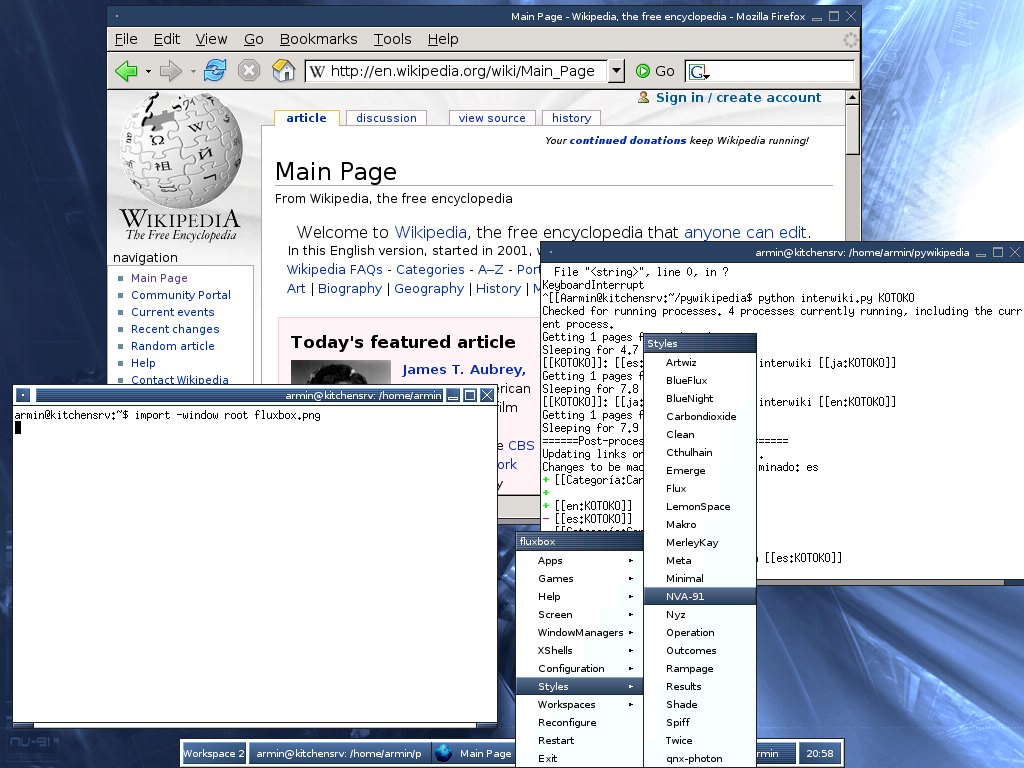
Design and key characteristics
The interface of Fluxbox is deliberately restrained: it offers a small panel (sometimes called a slit) and a workarea menu accessible with a right-click on the desktop. Window decorations are lightweight but configurable, and Fluxbox supports features not present in Blackbox such as window tabbing and configurable titlebar buttons. Visual options include solid colors, gradients, and border styles; additional compositing tools can be used to add true transparency and other effects.
- Low resource footprint: designed to run on older or modest hardware and to load quickly, making it popular for live systems and small distributions. Live CDs and minimal installs commonly ship Fluxbox.
- Text-based configuration: most settings are stored in plain text files that users can edit directly, enabling automation and fine customization. See the configuration files and menu format for examples.
- Extensible appearance: styles, fonts and titlebar layout are adjustable; compositors such as external utilities can provide additional eye candy.
- Window management features: tabbed windows, customizable focus and stacking behavior, keyboard shortcuts, and per-application rules.
Configuration and customization
Fluxbox is configured primarily by editing a few plain-text files in the user's configuration directory. Typical files allow customization of the root menu, keyboard shortcuts and general settings. Because the configuration is textual, it is easy to script changes, distribute standard profiles or version-control personal setups. Users often combine Fluxbox with lightweight panels, file managers or desktop utilities to add icons and launchers when desired.
History and development
Fluxbox began as a derivative of the Blackbox window manager and has since evolved with its own feature set and community. Its steady focus has been on keeping the core small while allowing users to extend and tailor their desktop experience. Over time Fluxbox has accumulated capabilities that appeal to both keyboard-centered users and those who prefer a minimal graphical environment.
Uses, examples and distributions
Because of its quick startup and modest memory needs, Fluxbox has been used widely on live media and in distributions aimed at older hardware. Examples of projects and distributions that have included Fluxbox at various times include Knoppix and other bootable systems such as GParted live. It was long used in small-footprint distributions such as Damn Small Linux, and it serves as the default or optional window manager in distributions oriented toward old computers or minimalism, including antiX (which traces roots through MEPIS), PCFluxboxOS, and specialized live images like LinguasOS. Community remixes and spins such as Fluxbuntu combine a lightweight base (often Ubuntu) with Fluxbox and selective, lightweight applications to produce a simple, fast desktop.
Notable distinctions and practical considerations
Fluxbox differs from full desktop environments by intentionally omitting integrated components such as a built-in file manager, system settings daemon or notification framework; users typically add only what they need. This modular approach means Fluxbox can be paired with a variety of utilities to build a personalized workspace. New users should be prepared to edit configuration files or use simple GUI helpers to tune behavior, while experienced users often value Fluxbox for its predictability and small attack surface.
For further reading and downloads, consult resources about the X Window System, general guides to choosing a lightweight window manager, and documentation or forums where the Fluxbox community shares themes, menu snippets and tips. More specific references include discussions of the Fluxbox user interface, third-party utilities and archived tools such as iDesk/fbdesk that can add desktop icons.
- X Window System overview
- Lightweight window managers
- Fluxbox user interface guide
- Fluxbox configuration files
- Desktop enhancement utilities
- Live CD usage examples
- GParted live
- Damn Small Linux
- antiX distribution
- MEPIS heritage
- PCLinuxOS / PCFluxboxOS
- LinguasOS live image
- Fluxbuntu project
- Ubuntu (as a base)
- Lightweight applications for Fluxbox
Questions and answers
Q: What is Fluxbox?
A: Fluxbox is an X window manager based on Blackbox 0.61.1 that tries to be lightweight and customizable.
Q: What does the user interface of Fluxbox consist of?
A: The user interface of Fluxbox consists of a taskbar and a menu that can be accessed by right-clicking on the desktop.
Q: How are basic settings in Fluxbox controlled?
A: All basic settings in Fluxbox are controlled by text files.
Q: What kind of eye candy can be shown with Fluxbox?
A: With Fluxbox, colors, gradients, borders, and other basic appearance settings can be changed. Additionally, effects managers such as Xcompmgr and transset-df can add true transparency to desktop elements and windows.
Q: Are there any features in Fluxbox that BlackBox does not have?
A: Yes, there are several features in flux box that BlackBox does not have including tabbed windows and a configurable titlebar.
Q: Is it popular for use in Live CDs?
A: Yes, due to its small memory use and quick loading time, FluxBox is popular for use in many Live CDs such as Knoppix STD and GParted.
Q: Are there any Linux distributions which use it as their default window manager?
A:Yes, it is currently the default window manager for antiX Archived 2009-04-30 at the Wayback Machine , PCFluxbouxOS , a remaster of PCLinuxOS , LinguasOS , a Live CD distribution for professional translators ,and was previously used as the default window manager for Damn Small Linux before being replaced with JWM after version 4 .0 . It is also used by the Linux distribution called "Fluxbuntu" which combines Ubuntu with flux box and lightweight applications .
Related articles
Author
AlegsaOnline.com Fluxbox: a lightweight X Window System window manager Leandro Alegsa
URL: https://en.alegsaonline.com/art/35296
Sources
- linux.org : "Using the Fluxbox Window Manager"
- fluxbox-wiki.org : Eye candy - Fluxbox-wiki
- fluxbuntu.org : Fluxbuntu Home