
QBasic: Microsoft’s beginner-oriented BASIC interpreter and IDE
QBasic is a simplified Microsoft BASIC interpreter and integrated editor once bundled with MS‑DOS and early Windows. Designed for learning and small utilities, it remains popular for education and retro computing.
Overview
QBasic is a compact, beginner-friendly dialect of the BASIC family produced by Microsoft. It combines a readable, structured variant of BASIC with an integrated text editor and a run-time so programs can be written, edited and executed within the same environment. Microsoft distributed QBasic with many MS‑DOS and early Windows releases, making it one of the first programming environments that many students and hobbyists encountered. For introductory material and archived documentation see developer archives.
Image gallery
3 Images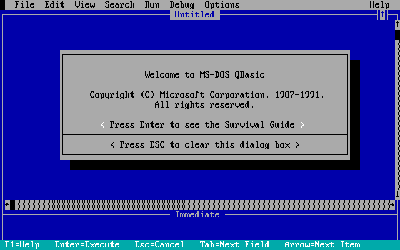


Characteristics
QBasic emphasizes clarity and simple control structures. Programs are typically procedural, supporting SUB and FUNCTION routines, simple variables and arrays, standard control statements (IF, FOR, WHILE-like loops) and basic file I/O. Unlike Microsoft’s commercial QuickBASIC product, QBasic is an interpreted environment and does not produce standalone executables; it is intended for small utilities, teaching and experimentation. The editor includes on-screen help, syntax reminders and immediate execution, which lowers the barrier to testing and learning.
Features and typical uses
- Learning and teaching: QBasic has long been used in classrooms and self-study to demonstrate algorithms, control flow and basic data handling.
- Interactive exploration: beginners can type code, run it immediately and adjust behavior without a separate compile step.
- Hobbyist and retro projects: enthusiasts recreate classic text and simple graphical games, utilities and demos that run in DOS-compatible environments.
- Rapid prototyping: short scripts and small tools are easy to write, test and iterate within the integrated interface.
History and development
QBasic originated as a streamlined, no-cost derivative of Microsoft’s earlier QuickBASIC system. QuickBASIC, introduced in the mid-1980s, provided a richer commercial compiler and more advanced libraries; QBasic retained core language features but removed the compiler and some advanced facilities so it could be distributed freely with operating systems. For historical overviews and community recollections see QBasic resources.
Legacy, compatibility and modern use
Although largely obsolete as a tool for modern application development, QBasic left a lasting educational legacy. Community efforts have produced interpreters, compatible compilers and emulators that allow QBasic programs to run on current platforms or to be converted into native executables. Popular compatibility efforts and forks extend language features and support modern operating systems; information on these projects and binary archives can be found through compatibility projects and archive collections.
Running and learning today
Many learners and retrocomputing fans run original QBasic in DOS emulators or use modern, compatible implementations that reproduce the original behavior while adding enhancements. A variety of tutorials, textbooks and online guides remain available for newcomers; curated learning lists and classroom materials are linked from learning guides. When exploring QBasic, it is useful to remember its context: an interpreted, educational environment intended to teach programming fundamentals rather than to serve as a platform for large-scale software development.
Notable distinctions: QBasic is distinct from Visual Basic and other later Microsoft languages that target graphical application development and component-based programming. Its simplicity and immediate feedback made it a practical first step toward structured programming and helped introduce generations of programmers to fundamental concepts.
Related articles
Author
AlegsaOnline.com QBasic: Microsoft’s beginner-oriented BASIC interpreter and IDE Leandro Alegsa
URL: https://en.alegsaonline.com/art/80315
Sources
- emsps.com : "Microsoft BASIC version information"