
Microsoft Paint (MS Paint): overview, features, history and uses
Microsoft Paint is a basic raster graphics editor included with Microsoft Windows. It offers simple drawing tools, basic editing, and common image format support, widely used for quick edits and beginner artwork.
Overview
Microsoft Paint, often called MS Paint or simply Paint, is a straightforward raster graphics program that has been distributed with Microsoft Windows for decades. It enables users to create, edit and annotate simple bitmap images using an uncomplicated interface aimed at beginners and casual users. While it lacks advanced photo-editing features, its accessibility and low learning curve make it a frequent first tool for quick edits, screenshots, simple drawings and teaching basic digital art concepts.
Image gallery
4 Images

Main features and tools
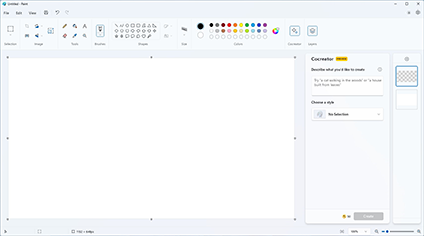
Paint provides a compact set of tools designed for freehand and geometric drawing, color selection, and simple image manipulation. Typical elements include:
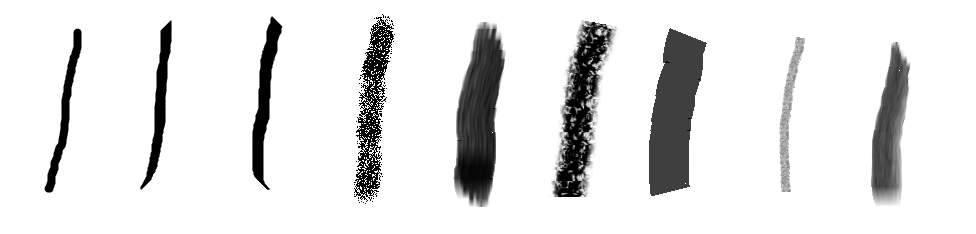
- Freehand pencil and brush tools for drawing and pixel-level work.
- Shape tools (rectangles, ellipses, polygons, and preset shapes) with outline and fill options.
- Line and curve tools for straight and curved strokes.
- Fill (paint bucket), spray, and eraser tools for quick edits.
- Selection tools to move, copy, cut and paste rectangular or free-form regions.
- Text tool for adding captions and labels to images.
- A color palette with an "Edit Colors" option to define custom hues.
These controls are arranged for immediate use: users can pick a color, select a tool, and begin drawing without complex setup. For further information on the official application and its interface, see the product information.
File formats, limitations and distinctions
Paint supports common bitmap formats such as BMP, JPEG, PNG, and GIF, which makes it suitable for everyday tasks like cropping, resizing and saving screenshots. However, it is a non‑layered editor: edits are applied directly to the image and there is no native layer stack or professional retouching features. Historically, Paint has had limited support for true alpha-channel transparency and advanced color management, which distinguishes it from multi-layered editors like Adobe Photoshop. For quick color palette tips, tutorials and color resources, users often consult external guides such as color palette help.
History and development
Paint was introduced as part of the Windows operating system in the 1980s and has been updated in successive Windows releases. Over time it gained support for additional file formats, improved drawing tools and interface refinements. In the late 2010s Microsoft announced changes to its bundled graphics offerings that included a newer app and transitions for Paint’s role; that prompted public discussion about the program’s future. Microsoft has since kept Paint available to users and continued to provide alternatives and supplemental apps, notably introducing a more modern companion application for 3D and advanced image workflows. For background on the program’s evolution, see materials from Microsoft and community summaries at the vendor.
Uses, audience and cultural notes
Paint remains popular for simple, immediate tasks: trimming and annotating screenshots, producing pixel art, mockups, educational demonstrations and children’s digital drawing. Its simplicity also made it the subject of many internet tutorials and creative projects—novice artists and hobbyists often learn composition, color mixing and pixel techniques with Paint before moving to more complex software. Community tutorials and how‑to resources are widely available; beginners can find step‑by‑step guides and creative challenges through many online collections referenced by hobbyists at tutorial portals.
Notable facts: despite being one of the simplest graphic utilities bundled with Windows, Paint has endured as a cultural touchstone for early computer graphics learning and quick, no‑friction image tasks.
Related articles
Author
AlegsaOnline.com Microsoft Paint (MS Paint): overview, features, history and uses Leandro Alegsa
URL: https://en.alegsaonline.com/art/64626