
Crash (computing)
A computing crash is an abrupt stop or malfunction of software or an operating system, caused by bugs, hardware faults, drivers, resource errors or security issues; this article explains causes, signs and recovery.
A computing crash is an unexpected termination or unresponsiveness of software. It can affect a single program or the entire operating system. Symptoms range from a single application closing without warning to a complete freeze, repeated error dialogs, or a diagnostic screen (for example the well-known Blue Screen of Death). Crashes often produce a report, log entry, or memory dump that helps diagnose the root cause.
Image gallery
6 Images
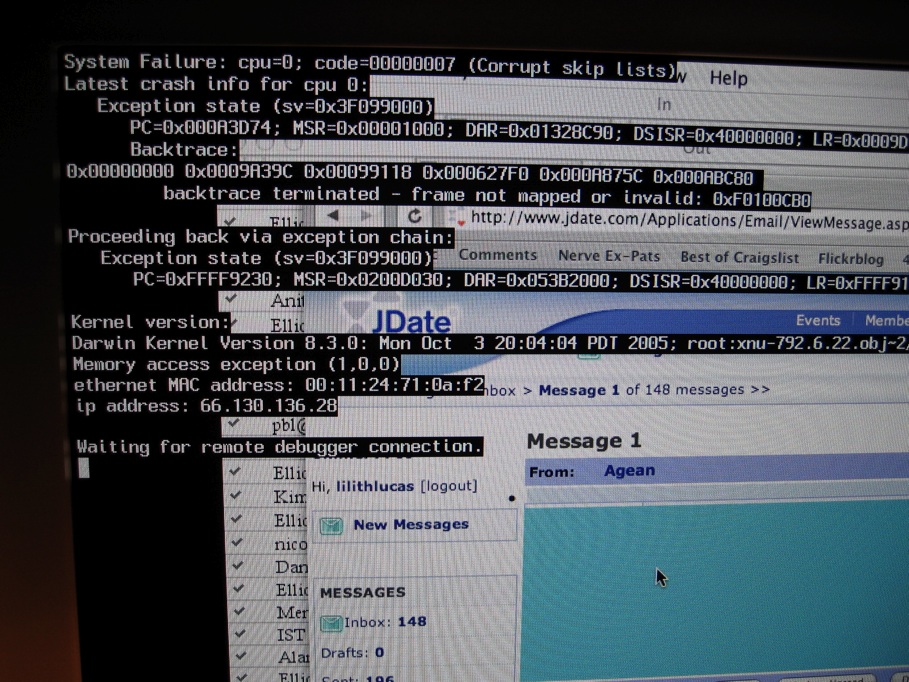


Causes and technical characteristics
Crashes usually occur when executable instructions cannot proceed safely. Common technical causes include errors in machine instructions (such as an illegal jump or access to invalid memory), buffer overflows, null pointer dereferences, race conditions, unhandled exceptions, or resource exhaustion. Hardware faults such as failing memory or storage can trigger system-level failures, and a poorly implemented device driver can destabilize the entire system. When a crash happens, the runtime may create a crash report, generate a core dump, or write events to an audit log for later analysis.
Typical signs and immediate effects
Application crashes often close the program and discard unsaved changes; therefore frequent and automated backups of important files and versioned saving reduce data loss. System crashes can cause all running software to halt, require a reboot, or enter a recovery mode. Some operating systems isolate faults so one process can fail without taking others down, but not all environments provide full isolation.
History and evolution
Early computing systems were less protected against faults; a single erroneous memory write could stop the whole machine. As systems evolved, hardware memory protection, process isolation and richer operating system services reduced the scope of crashes. Modern operating systems incorporate error reporting, kernel recovery features, and safer driver models to limit the frequency and impact of catastrophic failures.
Diagnosis and common troubleshooting
Diagnosing a crash usually starts with logs and diagnostic files. Developers and administrators examine stack traces, exception messages and core dumps; end users may rely on automatic error reports. Typical troubleshooting steps include:
- Checking event or system logs for error codes and timestamps.
- Reproducing the problem with debugging tools or in a controlled environment.
- Updating or rolling back drivers and system updates; many crashes trace to faulty drivers or firmware.
- Testing hardware components (memory, disk, power) and replacing defective parts.
- Applying software patches to fix bugs that cause illegal operations or memory corruption.
Prevention, best practices and notable distinctions
Best practices to reduce crash risks include defensive programming, input validation to avoid buffer overflows, strict memory management, and using sandboxed or isolated processes for untrusted code. Regular backups and version control limit data loss when crashes occur. It is useful to distinguish between an application crash (single program failure), a service crash (background process stops), and an operating system crash (system-wide failure requiring restart).
For more detailed guidance and tools for debugging or recovery, consult platform-specific documentation and support resources. Developers and system administrators should monitor crash reports and trends to address recurring faults proactively and improve system resilience.
Program behavior, operating system responses, machine instruction errors, backup strategies, file protection, hardware testing and driver maintenance are all relevant when preventing and resolving crashes.
Related articles
Author
AlegsaOnline.com Crash (computing) Leandro Alegsa
URL: https://en.alegsaonline.com/art/23982