
Windows Update — Microsoft system update and patch service
Windows Update is Microsoft’s service for delivering security patches, feature upgrades, drivers and definition updates to Windows devices, with options for automatic or managed deployment.
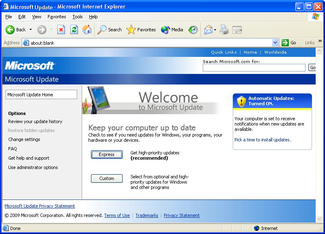
Windows Update is the name given to Microsoft’s mechanism for distributing software updates to the Windows operating system and related Microsoft components. Originally provided as a web-based service accessed through Internet Explorer, it has since become an integrated service inside Windows that delivers security fixes, reliability improvements, device drivers and other package types. The service is maintained by Microsoft and traces its origins to the late 1990s and early Windows releases such as Windows 98, when updates were primarily obtained from a website viewed in Internet Explorer.
Image gallery
6 Images


How it works
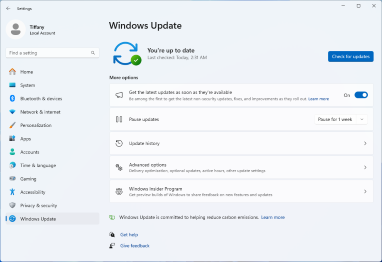
Modern Windows Update combines a background agent and system components that check Microsoft servers (or internal update servers) for available files, download them, and apply them according to configured policies. End users can choose to let updates install automatically, pause them temporarily, or install manually. Administrators can control distribution through enterprise tools and services. The update mechanism supports staged downloads, mandatory restarts for certain updates, and rollback in many cases when an update fails.
Types of updates
- Security and quality updates: fixes for vulnerabilities and stability issues.
- Feature updates: larger releases that add new features or overhaul components.
- Driver updates: updated hardware drivers provided through the update channel.
- Definition and signature updates: small, frequent files for antimalware engines such as Windows Defender.
- Application updates: optional updates for bundled apps, e-mail junk filters such as those used by Windows Mail, and other Microsoft products when enabled.
History and deployment options
Over time Microsoft moved from a website model to a built-in update client and then to multiple management layers: consumer-focused Settings pages, enterprise services like Windows Server Update Services (WSUS), and cloud-based management such as Windows Update for Business. Updates are often released on a regular cadence (commonly known as monthly security releases), while out-of-band patches may appear for urgent issues. Delivery Optimization and peer-to-peer distribution can reduce bandwidth by sharing updates between nearby devices.
Importance and notable considerations
Keeping Windows Update enabled is a primary defense against known vulnerabilities and is important for device compatibility and performance. However, updates can sometimes require reboots or temporarily disrupt services, so many organizations schedule deployments or test updates before wide rollout. Troubleshooting tools, update logs and safe-mode recovery options exist to address problematic updates.
Related articles
Author
AlegsaOnline.com Windows Update — Microsoft system update and patch service Leandro Alegsa
URL: https://en.alegsaonline.com/art/108540