
UNetbootin — Universal Netboot Installer
UNetbootin is a utility for creating bootable Live USB drives and installing many Linux distributions and utilities without a CD, available for Windows, macOS and Linux.
UNetbootin (Universal Netboot Installer) is a lightweight, cross-platform utility used to create bootable Live USB drives and to load system utilities or operating-system installers without requiring optical media. It runs on Windows, macOS and Linux and can either download supported Linux distributions automatically or use a local ISO image to make a bootable USB device.
Image gallery
2 Images
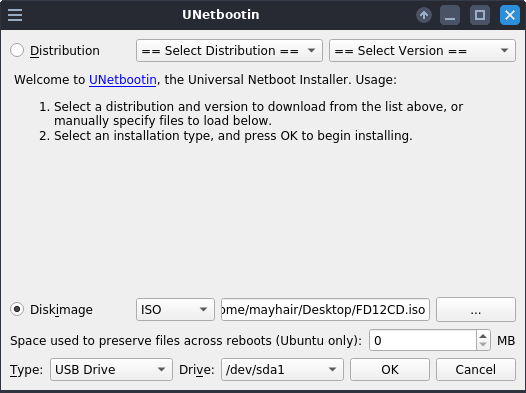
How it works
The program writes a small bootloader to a USB device and copies distribution files or ISO contents so a machine can start (boot) from the USB drive. Many users choose UNetbootin to test a distribution live, perform installations on machines without CD/DVD drives, or run recovery tools. It can also install distributions in a "frugal" mode by copying files to a partition when full installation is not wanted.
Features and characteristics
- Cross-platform graphical interface for Windows, macOS and Linux.
- Option to download popular Linux distributions automatically or use a local ISO image.
- Creates Live USBs and supports persistent storage for some distributions.
- Simple bootloader setup without manual partitioning for typical use cases.
History and development
UNetbootin was originally developed as a straightforward way to create bootable USB installers for Linux at a time when many PCs lacked optical drives. The software gained popularity because of its simplicity and multi-platform support. Versions have been maintained by volunteers and contributors; users should check the current project page for the latest status and compatible distributions.
Uses, examples and limitations
Common use cases include trying a distribution in a live session, installing Linux on new hardware, or carrying portable system utilities for diagnostics and repair. While convenient, UNetbootin may not support every distribution's custom installer or advanced features; some modern images require different tools that support hybrid ISO formats, UEFI, or secure boot. For guidance and downloads see the project resources: project homepage, supported distributions list, usage instructions, and troubleshooting.
Alternatives and complementary tools exist for more complex scenarios, so users should choose based on target hardware (BIOS vs UEFI), required persistence, and the specific ISO format they intend to use.
Related articles
Author
AlegsaOnline.com UNetbootin — Universal Netboot Installer Leandro Alegsa
URL: https://en.alegsaonline.com/art/102831
Sources
- books.google.com : "UNetbootin"
- worldcat.org : OCLC 435462743
- books.google.com : "UNetbootin"
- worldcat.org : OCLC 707969716