
Google Drive
Google Drive is Google’s cloud storage and file synchronization service that stores files online, enables collaboration with Google Workspace apps, sharing controls, and multi-device access.
Overview
Google Drive is a cloud storage and file synchronization service offered by Google. It lets individuals and organizations store documents, photos, videos, and other file types on remote servers and access them from web browsers, desktop clients, and mobile apps. Drive also links directly with Google Workspace apps (Docs, Sheets, Slides) to provide real-time collaborative editing and simple file sharing.
Image gallery
1 Image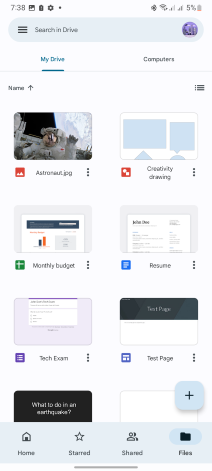
How it works and main features
Files uploaded to Drive can be organized into folders, tagged with quick preview and search features, and shared with fine-grained permission controls (view, comment, edit). Key features include:
- Synchronization: Desktop and mobile apps keep local files synchronized with the cloud, offering both mirrored and streamed access models.
- Collaboration: Multiple users can edit supported documents simultaneously with version history and comments.
- Search and previews: Powerful search and preview of many file types without downloading.
- Offline access: Selected files or folders can be made available offline on devices.
- APIs and integrations: Third-party apps and services can connect to Drive through documented APIs.
History and development
Google Drive was launched in April 2012, building on Google’s earlier online document editing tools and expanding them into a general-purpose cloud storage platform. Over time Google introduced desktop synchronization tools (rebranded as Drive for desktop), mobile applications for Android and iOS, and tighter integration with Workspace (formerly G Suite) for enterprise users.
Uses and examples
Drive is used for personal backups, collaborative projects, classroom assignments, and corporate file sharing. Common examples include shared team folders, versioned document collaboration, storing media for easy cross-device playback, and distributing resources to a controlled audience via shareable links or domain-restricted access.
Security, editions, and limitations
Google encrypts data in transit and at rest and offers account security features such as two-step verification. Drive is available in free and paid tiers (storage pooled across Drive and other Google services). Google provides additional administrative controls, audit logs, and compliance options in Workspace editions. Users should weigh provider policies, storage quotas, and organizational requirements when storing sensitive data.
For official product information and account options, see the Google Drive product page.
Related articles
Author
AlegsaOnline.com Google Drive Leandro Alegsa
URL: https://en.alegsaonline.com/art/39684