
Outlook.com — Microsoft's consumer webmail and personal information service
Outlook.com is Microsoft's web-based email, calendar and contacts service (successor to Hotmail), offering web and mobile access, OneDrive integration, security features and business options.
Outlook.com is Microsoft’s cloud-based personal email and productivity service that combines webmail, calendar, contact management and file integration. Launched under the Hotmail name in 1996 and acquired by Microsoft in 1997, the service evolved through several brands before being relaunched as Outlook.com in 2013. It is positioned as the consumer counterpart to Microsoft Exchange Online and the Outlook desktop and mobile apps, and it interoperates with Microsoft 365 services and cloud storage.
Image gallery
9 Images




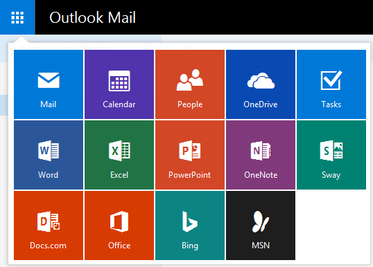
Core features and interface
The service provides a web client accessed through a browser and native mobile apps. Key features include threaded conversations, a calendar with event scheduling, an address book for contacts, mailbox organization tools (folders, rules, and sweep), message filtering, and support for aliases. Attachments can be saved directly to cloud storage and large files are often shared via integrated file links. In recent years Microsoft added features like Focused Inbox for sorting important mail, built-in search, and integrations with other productivity apps.
Security and protocols
Outlook.com supports standard mail protocols (IMAP, POP and SMTP) for third-party clients and uses modern authentication options for Microsoft accounts. Consumer-oriented security includes two-step verification, recovery options, spam and phishing protection, and encrypted connections. For business customers, integration with Exchange ActiveSync and Exchange Online adds enterprise-grade controls and secure policy enforcement.
History and development
- 1996 — Service launched as Hotmail by Sabeer Bhatia and Jack Smith.
- 1997 — Acquired by Microsoft and later rebranded as MSN Hotmail and Windows Live Hotmail.
- 2013 — Major redesign and migration to the Outlook.com brand and modern backend services.
The transition to Outlook.com unified Microsoft’s consumer email approach with its other communication and productivity offerings and made it simpler to tie a personal mailbox to OneDrive and Office online experiences.
Uses and editions
Outlook.com is used by individual consumers for everyday email and calendar needs and by small organizations that opt for consumer-grade accounts. Microsoft also offers paid and enterprise alternatives through Microsoft 365 and Exchange Online for businesses that require custom domains, enhanced compliance, larger mailboxes, and administrative controls. Users can learn about the consumer service on the official Outlook.com site and find corporate information at Microsoft.
Notable distinctions and resources
- Outlook.com (web service) is distinct from the Outlook desktop client—both share branding but differ by platform and capabilities.
- Legacy Hotmail accounts were migrated to Outlook.com during the redesign; Microsoft continues to support account aliases and legacy addresses.
- Storage and cloud file handling are integrated with Microsoft’s file service (see OneDrive references) and business domain options are available for organizations (domain and business services).
For background on the earlier Windows Live branding and historical context, see the archived Windows Live materials (Windows Live). Whether used casually or as part of a paid Microsoft subscription, Outlook.com remains a central consumer-facing gateway to Microsoft’s communication and productivity ecosystem.
Related articles
Author
AlegsaOnline.com Outlook.com — Microsoft's consumer webmail and personal information service Leandro Alegsa
URL: https://en.alegsaonline.com/art/73669
Sources
- stanfordalumni.org : "What's the Big Idea?"