
Phishing: methods, common types, prevention, and response
Phishing is a form of social engineering where attackers trick people into revealing credentials, financial data or identities. This article explains how it works, types, warning signs and steps to prevent or recover from attacks.
Overview
Phishing is a broad category of fraud in which an attacker impersonates a person, company or service to induce victims to reveal sensitive information such as usernames, passwords, payment details or personal identifiers. Although email is the most familiar medium for phishing, attackers also use text messages, phone calls, social media, instant messaging apps and even postal mail. The goal is usually financial theft, account takeover, or data that can be used for identity fraud.
Image gallery
4 Images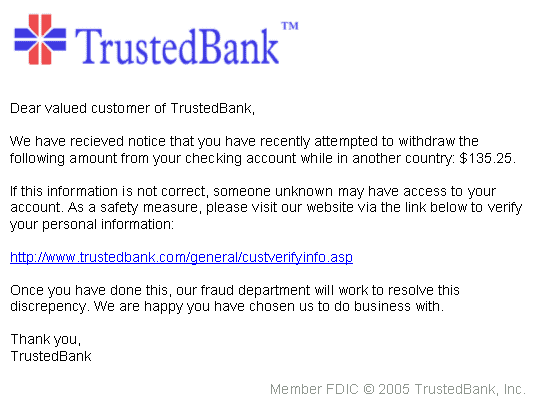


How phishing schemes work
Typical phishing attacks follow a simple social-engineering pattern: the attacker creates a convincing message that appears to come from a trusted source, includes a reason for urgency or fear, and provides a link, attachment, or phone number to a fake site or a script designed to capture credentials or install malware. Some campaigns are broad and automated, while others are highly targeted and personalized.
- Spoofed communications: Headers, logos and wording are copied so messages look legitimate.
- Malicious links: URLs lead to counterfeit login pages or files that deliver malware.
- Fake attachments: Documents or installers that, when opened, execute harmful code.
- Psychological triggers: Messages often invoke urgency, fear, or reward to prompt quick action.
Common types of phishing
Phishing takes several forms with specific names reflecting their targets or methods.
- Generic email phishing: Bulk messages sent to many recipients hoping some will respond.
- Spear phishing: Targeted attacks crafted for a particular person or organization, often using personal details.
- Smishing and vishing: SMS-based (smishing) and voice-call (vishing) versions of the scam.
- Business Email Compromise (BEC): Fraud that impersonates company executives or vendors to trick staff into transferring funds or disclosing credentials.
- Clone and credential-harvesting sites: Near-identical copies of real websites created to collect login data.
Signs of phishing and basic prevention
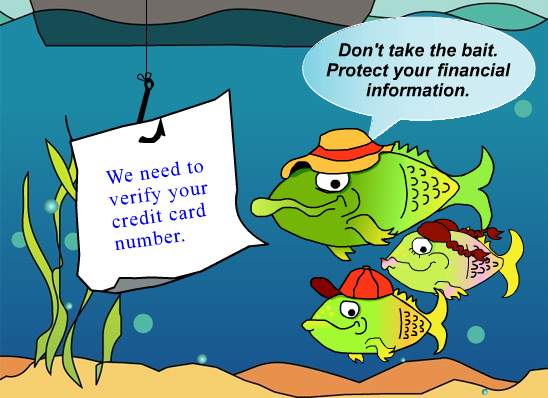
There are common indicators that a message may be fraudulent: unexpected requests for credentials, misspellings and awkward language, suspicious sender addresses, mismatched URLs, unsolicited attachments, and pressure to act quickly. Basic defensive steps include using unique, strong passwords and a password manager; enabling multi-factor authentication (MFA); verifying requests by contacting the sender by a known channel; and keeping software and security tools up to date.
- Hover over links to check the real destination before clicking.
- Do not provide passwords or payment details in response to unsolicited messages.
- Use MFA and monitor account activity regularly.
- Train employees and family members to recognize social-engineering tactics.
What to do if you are targeted or compromised
If you suspect a phishing attempt, do not click links or open attachments. If you already entered credentials, change passwords immediately and enable multi-factor authentication where possible. Notify your bank or service providers if financial information was exposed. Report the incident to your organization's IT/security team and to appropriate authorities or fraud-reporting services. For identity concerns, consider placing fraud alerts with credit bureaus and monitoring credit reports.
History and notable trends
Phishing has been a persistent threat since the early days of widespread Internet use. While the basic idea—deception to obtain secrets—has not changed, attackers have evolved tactics: targeted spear phishing, account takeover from social networks, automated phishing kits, and use of short-lived domains to evade detection. Organizations respond by improving email authentication (e.g., DMARC), user education, and deploying anti-phishing technologies.
For further information on password safety and guidance on recognizing scams, consult trustworthy resources such as security advisories and official guidance from your service providers. Learn more about common scams at security guidance, verify banking messages via official channels at banking safety, and find identity-theft recovery options at identity protection.
Questions and answers
Q: What is phishing?
A: Phishing is a way that criminals obtain sensitive information like usernames and passwords by using social engineering tactics.
Q: How is phishing usually done?
A: Phishing is usually done through electronic mail. The email appears to come from a legitimate service provider and asks users to re-enter their usernames and passwords to confirm them.
Q: What happens if criminals successfully phish sensitive information?
A: If criminals successfully phish sensitive information, they are able to gain access to bank accounts or other accounts like shopping, auction or gaming accounts, which can ultimately lead to identity theft.
Q: Has phishing changed over the lifetime of the internet?
A: Phishing has changed surprisingly little over the lifetime of the internet, although certain phishing tactics have gotten much more sophisticated.
Q: How do criminals use email to carry out phishing?
A: Criminals use spoofed email addresses to create emails that are designed to look just like emails sent from a real company.
Q: Can phishing be done through other forms of communication?
A: Yes, phishing can also be done through text, instant messaging apps like Facebook Messenger or WhatsApp, and even through snail mail.
Q: How can you identify a potential phishing link through text?
A: If you receive a text from an unknown number that tells you to visit a specific website for any reason, it might be a phishing link.
Related articles
Author
AlegsaOnline.com Phishing: methods, common types, prevention, and response Leandro Alegsa
URL: https://en.alegsaonline.com/art/76519