
Webmail: Web-based email services, history, features, and uses
Webmail is email accessed through a web browser. This article explains how webmail works, its history, typical features, advantages and limitations, and distinctions from desktop email clients.
Webmail, or web-based email, refers to email services that users access through a web browser rather than a dedicated desktop client. A typical webmail service stores messages on remote servers and presents them in a browser interface so people can read, compose and manage mail from any Internet-connected computer or mobile device.
Image gallery
1 Image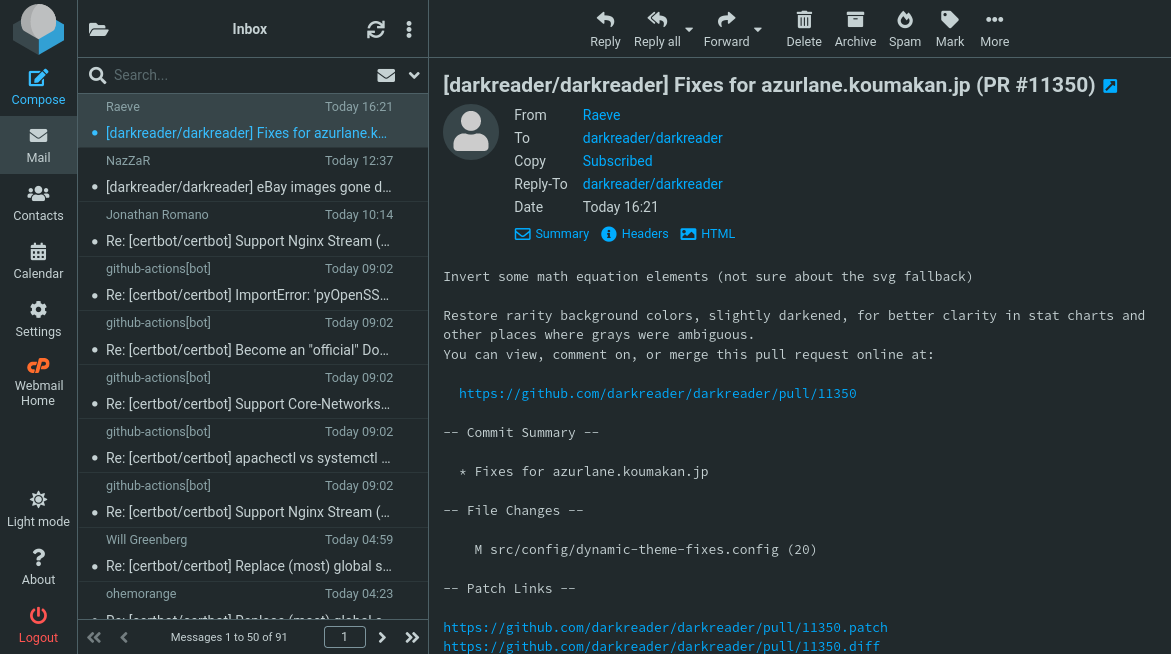
How it works and key components
Webmail combines server-side mail storage and a browser-based user interface. Users log in to a web application which communicates with mail servers using standard protocols (such as IMAP, POP and SMTP behind the scenes) and displays folders, message lists and composition tools in HTML and JavaScript. Access is through a web browser like the ones referenced at web browser, instead of an installed program such as Microsoft Outlook. Popular consumer examples include Gmail and other large providers.
Common features
- Centralized storage on provider servers and searchable message archives.
- Spam filtering, virus scanning, and integrated contacts and calendars.
- Attachment handling, labels/folders, and threaded conversations.
- Synchronization with mobile apps and desktop clients (via IMAP/POP) for offline access.
History and development
Webmail emerged in the mid-1990s as HTML and browser capabilities improved. Early consumer services popularized the idea that users need not run an email program locally. Over time webmail evolved to include richer interfaces, larger storage quotas and tighter integration with cloud services. It is often discussed alongside broader Cloud computing trends that emphasize network-hosted applications.
Advantages and limitations
Advantages include accessibility from any machine with an Internet connection, centralized backups, and rapid updates by the provider. Users can compose mail on a public terminal or a personal device as long as they can reach the provider through the Internet. Limitations involve reliance on network access, potential privacy and security concerns if devices are shared, and differences in functionality compared with some advanced desktop clients.
In practice, many people use a hybrid approach: webmail for everyday access and provider conveniences, and dedicated clients or mobile apps for offline work or enterprise integration. When choosing a webmail provider, consider storage, security options (two-factor authentication, encryption), spam protections and how easily the service interoperates with other tools.
Related articles
Author
AlegsaOnline.com Webmail: Web-based email services, history, features, and uses Leandro Alegsa
URL: https://en.alegsaonline.com/art/107081