
Binary image (bilevel or 1-bit raster image)
A binary (bilevel) image stores each pixel as one of two values (commonly black or white). Used for text, barcodes, masks, fax and printing; produced by thresholding or dithering from grayscale or color sources.
A binary image is a raster graphic in which each pixel can assume only one of two values, commonly representing foreground and background (for example black and white). In storage terms it is a 1-bit-per-pixel image because each pixel requires a single bit to represent its state. The concept is most naturally understood in the context of a raster graphic, where an image is sampled into a grid of individual pixel elements and each pixel encodes one of two states.
Characteristics: Binary images are compact and simple to process. Pixels can be packed so that eight pixels share a byte, yielding efficient memory use and fast I/O for high-contrast imagery. Because only two levels are available, continuous-tone detail is lost; this makes bilevel images most suitable for text, line art, symbols and other high-contrast subjects rather than photographs or smooth gradients.
Image gallery
3 Images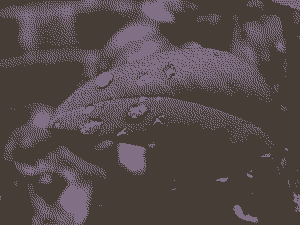

Creation and conversion
Converting a grayscale or color image to binary requires a decision step. The simplest method is global thresholding: pixels above a threshold become one value, and those below become the other. Adaptive (local) thresholding uses neighborhood statistics to cope with uneven illumination. To simulate shades or reduce visible artifacts, dithering algorithms distribute black and white pixels to give the perception of intermediate gray levels. Practical workflows often combine smoothing, contrast adjustment and binarization to optimize results for downstream use.
Operations and algorithms
- Connected-component analysis and contour extraction identify discrete objects in a binary mask.
- Morphological operations such as erosion and dilation are fast and commonly used for noise removal, gap filling and shape processing.
- Run-length encoding and similar schemes provide efficient compression for bilevel images, a technique widely used in document and fax standards.
Uses and devices
Binary images are central to many practical systems. Document scanning and optical character recognition (OCR) often begin with a binary image or use a binary mask as an intermediate step. Barcodes and QR codes rely on distinct binary contrast for reliable decoding. Traditional publishing and reprographic workflows have long used bilevel representations for halftone and screen processes in newspaper production, and output devices such as laser printers and facsimile machines typically work with bilevel bitmaps for the final printing stage.
In computer vision and image processing, binary images appear as edge maps, segmentation masks and morphological operation results. They are useful for fast prototyping and for algorithms that only need object shape information rather than intensity or color detail.
Limitations and considerations
The main limitation of the bilevel model is the lack of intermediate intensities, which removes subtle detail and can make small features vanish. Choice of thresholding strategy and pre-processing (contrast normalization, denoising) directly affects quality. For many practical tasks a trade-off is used: perform operations on grayscale or color data, then binarize at the final stage if needed for printing or machine reading.
Further reading: Introductory materials on pixels, raster graphics and practical image processing cover the fundamentals and common algorithms. Device- and workflow-level examples include laser printers, facsimile systems and newspaper reproduction chains, which illustrate why bilevel representations remain relevant in specific applications.
Related articles
Author
AlegsaOnline.com Binary image (bilevel or 1-bit raster image) Leandro Alegsa
URL: https://en.alegsaonline.com/art/11582