
Wii U GamePad: Nintendo's tablet-style controller for the Wii U
A compact overview of the Wii U GamePad: design, hardware features, use in asymmetric gameplay and Off-TV Play, reception, and its role with Amiibo and motion controls.
The Wii U GamePad is the primary controller introduced for Nintendo's Wii U console. Designed as a tablet-like peripheral, it combines traditional button controls and analog sticks with an integrated touchscreen and motion sensors to enable both conventional and asymmetric game interactions. It acts as a second screen for the console and can also stream a game's video output for play away from the television.
Image gallery
2 Images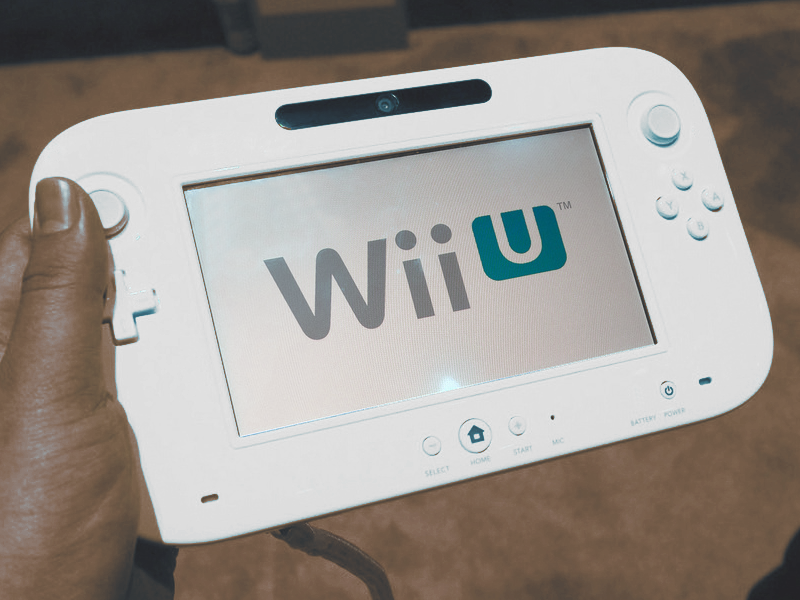

Design and hardware
The GamePad blends familiar controller elements—face buttons, dual analog sticks, shoulder buttons and a directional pad—with a built-in display and motion sensing. Its screen is a roughly 6-inch resistive touchscreen paired with a stylus for touch input. The unit also includes a front-facing camera, a microphone, and a set of motion sensors (gyroscope and accelerometer) that expand control options beyond conventional input.
Key features
- Second-screen display for map data, inventory, or full gameplay off-TV.
- Motion sensing for tilt and pointing interactions, alongside traditional controls.
- Near-field communication (NFC) support for figurines and cards, used with Amiibo.
- Integrated camera and microphone available to games and applications (camera).
- Built-in sensor bar functionality to assist with Wii Remote aiming and some legacy compatibility (sensor bar).
Because the GamePad streams video wirelessly from the console it depends on a battery and wireless link; reviewers frequently cited limited battery life as a practical drawback that affected extended play sessions. Nevertheless, its wireless video link enabled Nintendo's "Off-TV Play" feature, allowing a single-player to continue gaming without occupying the television.
History and reception
The GamePad debuted alongside the Wii U system and represented a deliberate attempt by Nintendo to expand controller concepts beyond buttons and sticks. Critics and players praised its ambition and the novel gameplay possibilities it unlocked, but adoption was mixed: some developers used its features creatively while others treated it as optional. The unit's battery performance and the complexity of supporting asymmetric modes were common points of criticism in reviews.
Uses, examples and legacy
In practice, the GamePad enabled asymmetric multiplayer designs (different information shown to different players) and unique single-player experiences that made use of touch, motion, or the camera. Notable titles demonstrated these possibilities by integrating private screens, drawing or scanning functions, and pointer-based mechanics. The GamePad's NFC support later became an important conduit for Nintendo's Amiibo figures, tying physical collectibles to in-game content.
For more on the Wii U console and how the GamePad interacts with the system, see Nintendo's platform materials at Wii U, and for details about the touchscreen and input, consult documentation or technical summaries at touchscreen resources.
Related articles
Author
AlegsaOnline.com Wii U GamePad: Nintendo's tablet-style controller for the Wii U Leandro Alegsa
URL: https://en.alegsaonline.com/art/108016