
OneDrive — Microsoft cloud storage, sync, and Office integration
OneDrive is Microsoft’s cloud file storage and synchronization service. It provides web, desktop, and mobile access, Office editing in the browser, file sharing, versioning and a business edition integrated with SharePoint.
OneDrive is Microsoft’s cloud-based file storage and synchronization service that lets people store, access and share files from multiple devices. It requires a Microsoft account and can be used through a web interface, desktop sync client and mobile apps. For official information and account options see the service page.
Image gallery
2 Images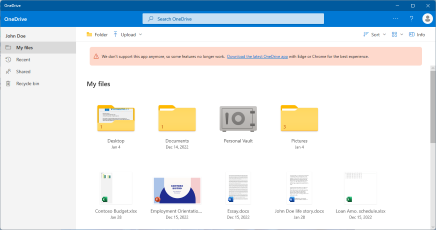

Key features
- Sync and backup — a desktop client keeps selected folders synchronized between local storage and the cloud, enabling automatic backup and restore of files.
- On-demand files — placeholders or selective sync reduce local disk use while keeping files visible in the file system.
- Sharing and collaboration — users create shareable links or invite others with configurable permissions for viewing or editing.
- Version history and recycle bin — prior versions of files can be restored and deleted items are recoverable for a limited period.
- Security options — two-factor authentication, encryption in transit and at rest, and a protected area for sensitive files are available.
Office integration and web editing
OneDrive is tightly integrated with Microsoft’s productivity apps so documents can be opened and edited directly in a browser using Office Web Apps / Office for the web. This enables real-time co-authoring and basic document editing without a desktop Office installation. Common document types supported include Word, Excel, PowerPoint and OneNote. The web interface and online editors are accessible from any modern browser (open in a browser).
History and editions
The service traces its roots to Microsoft’s earlier consumer cloud offerings and was formerly known by other names before becoming OneDrive. Over time it expanded from a simple file host to a platform integrated with Windows, Microsoft 365 subscriptions and enterprise services. In business and enterprise environments OneDrive for Business works alongside SharePoint to provide corporate file management and collaboration features.
Common uses and distinctions
People and organizations use OneDrive for personal backup, cross-device file access, file sharing, and collaborative editing. It differs from broader enterprise content platforms by focusing on personal file storage that can be shared, while OneDrive for Business and SharePoint handle organization-wide content management. Storage plans vary between the free tier and paid subscriptions, often bundled with Microsoft 365 offerings.
To begin, sign in with a Microsoft account and choose whether to use the desktop client, mobile app or the web UI. OneDrive’s integration with Windows (File Explorer), Office apps and services that were once part of the Windows Live family helps it sit at the center of Microsoft’s consumer and small-business cloud offerings — see the legacy context at Windows Live and review online help on the official page or the web interface (open in a browser).
Related articles
Author
AlegsaOnline.com OneDrive — Microsoft cloud storage, sync, and Office integration Leandro Alegsa
URL: https://en.alegsaonline.com/art/72614
Sources
- windows.microsoft.com : "Change views on the OneDrive website"
- onedrive.live.com : "Microsoft OneDrive"