
Microsoft OneNote
Microsoft OneNote is a digital notebook application for capturing, organizing and sharing typed, handwritten and multimedia notes across devices with cloud sync and collaboration.
Overview
OneNote is a digital notebook application designed to capture and organize notes in a flexible, freeform workspace. Users create notebooks that contain sections and pages, and can mix typed text, handwritten ink, audio, video, images and attached files. OneNote emphasizes quick capture and later retrieval, with full-text search and optical character recognition (OCR) for images and ink.
Image gallery
4 Images


Key features
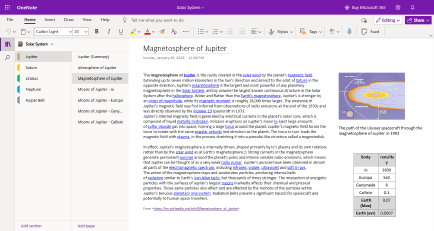
OneNote combines several note-taking functions into a single app. Important features include:
- Notebooks, sections and pages: hierarchical structure for organizing material.
- Ink and drawing: support for stylus and touch drawing, pressure sensitivity on compatible devices.
- Multimedia recording: audio and video recording embedded alongside notes.
- Search and tags: tags, indexing and OCR make content easy to find.
- Math and conversion tools: equation recognition and basic math assistance via specialized tools (math features).
History and development
Originally released as part of the Microsoft Office family in 2003, OneNote has been updated in successive Office releases and through standalone apps. Major refinements arrived with Office editions in the late 2000s and early 2010s. Over time Microsoft broadened platform support and cloud synchronization, and in the 2010s began offering free versions and web access to reach more users. The product is developed and maintained by Microsoft and remains part of the broader productivity ecosystem.
Uses and examples
OneNote is used in education, business and personal productivity. Teachers and students create class notebooks, professionals capture meeting notes and research, and individuals collect recipes, travel plans and reference material. Web clipping and page-saving tools let users capture online content for later annotation (web clipping), while audio recordings linked to notes help when reviewing lectures or meetings.
Compatibility, integration and notable distinctions
OneNote runs on Windows, macOS, iOS and Android, and as a web application with synchronization through cloud storage. It integrates with other productivity tools such as Microsoft Office apps, cloud storage and collaboration platforms. Compared with linear note apps, OneNote’s freeform canvas and rich ink support distinguish it for visual thinkers and anyone who mixes handwriting and multimedia with typed notes.
Practical tips
Organize content with a consistent notebook/section/page scheme, use tags to mark follow-ups, and attach source files or links for context. Regularly sync notebooks to cloud storage to keep content available across devices and to enable collaborative editing.
Related articles
Author
AlegsaOnline.com Microsoft OneNote Leandro Alegsa
URL: https://en.alegsaonline.com/art/64624