
Interlaced video: technique, history, uses, and challenges
Interlaced video is a scanning method that presents each picture as two interleaved fields to reduce flicker and conserve bandwidth; once dominant in broadcast TV, it now coexists with progressive formats and conversion tools.
Overview: Interlaced video is a raster-scanning method in which a complete picture (a frame) is built from two separate passes called fields. One field typically contains the odd-numbered horizontal lines and the other the even-numbered lines. The fields are displayed in sequence so the viewer perceives a full image composed of two interleaved halves. Interlacing was developed during the early era of electronic television to reduce visible flicker and to conserve transmission bandwidth while providing smoother perceived motion than a low-frame-rate progressive sequence.
Image gallery
6 Images


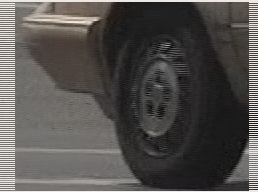
How interlacing works
Rather than sending or displaying every line of every frame at once, interlaced systems present the first field (odd lines) and then the second field (even lines). Two fields make one full frame; a system that produces 60 fields per second corresponds to 30 frames per second, while the display is updated 60 times per second. Common notations such as 480i, 576i and 1080i denote vertical resolution together with an interlaced scan.
Field order, cadence and standards
- Field order (which field is sent first) affects motion timing and must be preserved during editing and conversion.
- Analog and early digital broadcast standards adopted interlacing: examples include the families of standards associated with 60 Hz line timing and those associated with 50 Hz line timing.
- Many professional and consumer formats historically used interlaced profiles for compatibility with broadcast equipment and displays of the time.
Advantages
- Improved temporal smoothness: higher apparent update rate reduces flicker on displays with the appropriate persistence.
- Bandwidth efficiency: interlacing allowed acceptable motion portrayal with lower instantaneous bandwidth in early transmission systems.
- Compatibility with cathode-ray-tube (CRT) displays, which naturally blended successive lines.
Disadvantages and artifacts
Interlaced material can show artifacts when there is motion between fields. The most familiar symptom is "combing," where moving edges appear with alternating-line discontinuities. Other issues include jagged motion when fields are combined incorrectly, and loss of vertical resolution for moving objects. Interlaced sources also complicate editing, frame-accurate effects and modern compression schemes that assume progressive frames.
Deinterlacing and conversion
To display interlaced sources on progressive displays (flat-panel TVs, monitors, phones) they are commonly converted by deinterlacing algorithms. Simple methods include weaving (combining fields) or blending fields, which can introduce blur or ghosting. More advanced approaches are motion-adaptive or motion-compensated deinterlacing that detect movement between fields and attempt to preserve detail while avoiding combing. Film-to-video conversions use pulldown techniques to match differing frame and field rates.
Legacy and current practice
Interlaced scanning was central to broadcast television and many tape formats for decades. With the widespread adoption of progressive-scan displays and modern video codecs optimized for progressive frames, new production increasingly favors progressive formats. Nevertheless, interlaced material remains common in archives, some live broadcast workflows and legacy capture devices; proper handling and conversion are important to preserve image quality and temporal fidelity.
Related articles
Author
AlegsaOnline.com Interlaced video: technique, history, uses, and challenges Leandro Alegsa
URL: https://en.alegsaonline.com/art/47600