
Network interface card (NIC)
A network interface card (NIC) connects a computer to a network. This article explains its purpose, components, history, common form factors, and typical uses in wired and wireless networking.
Overview
A network interface card, commonly called a NIC or network card, is an electronic device that enables a computer to send and receive information over a network, typically a local area network (LAN). Historically sold as separate add-on cards, most modern systems include an integrated NIC on the motherboard or as a compact module. Whether internal or external, a NIC is a key piece of computer hardware that provides the physical and logical connection between a host and other networked systems.
Image gallery
6 Images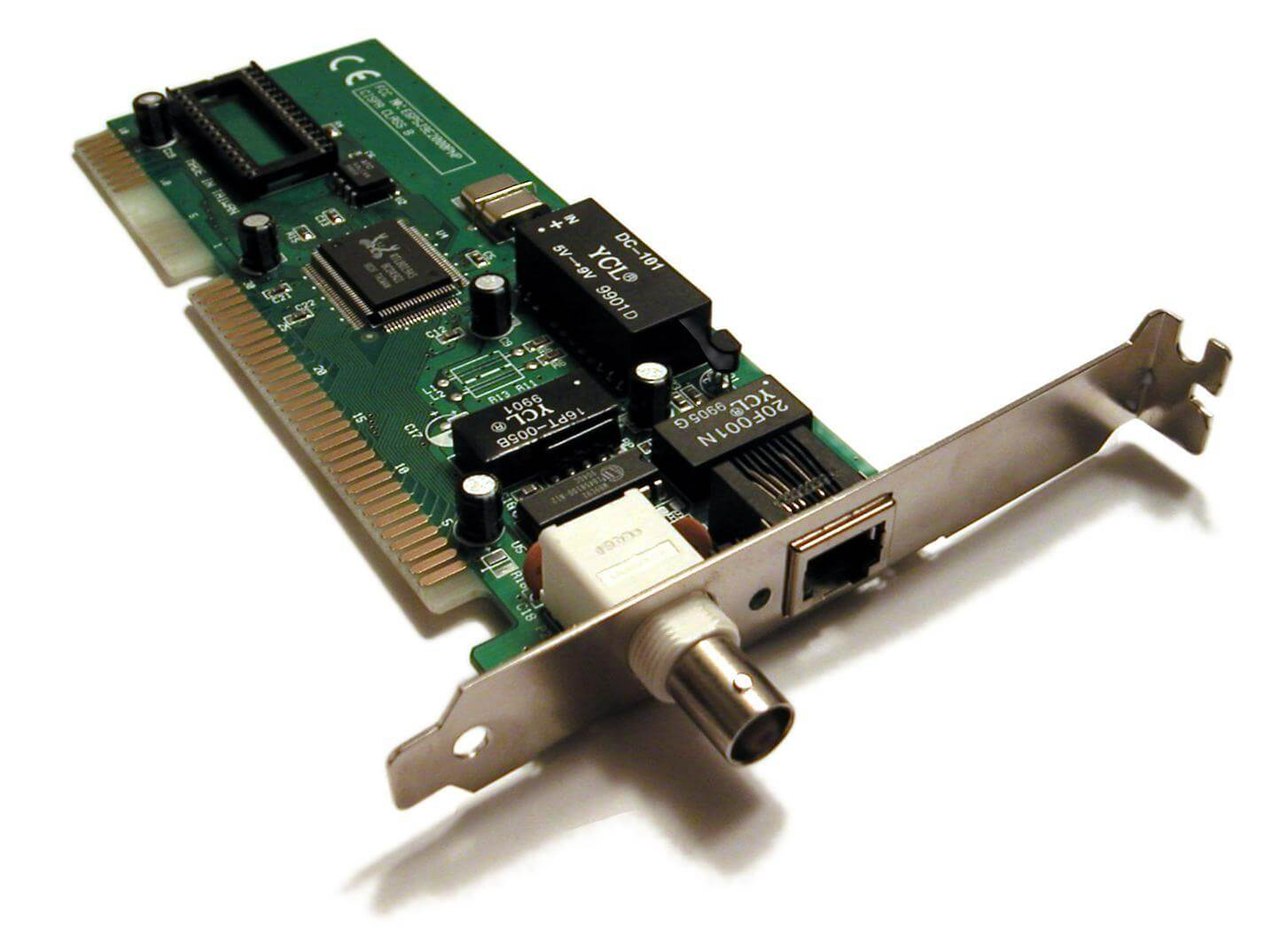


Function and basic operation
At a basic level a NIC converts streams of bytes from the host into electrical, optical, or radio signals suitable for transmission on the chosen medium, and it reverses that process for incoming traffic. The card handles framing, error detection, and medium access control so the host can exchange data reliably. Most NICs implement the physical layer and the data link layer of the OSI model, exposing a MAC (media access control) address that uniquely identifies the interface on a LAN. Many modern NICs also support offloading tasks such as checksum calculation, segmentation, and timestamping to reduce CPU load.
History and protocols
Network interfaces have evolved alongside networking standards. Early LAN technologies included systems such as ARCNET and vendor-specific solutions; other once-common approaches were LocalTalk and Token Ring. Over time Ethernet gained dominance and today most wired NICs use Ethernet signaling and framing, with many also supporting higher-speed or fiber variants commonly referred to simply as Ethernet. Wireless NICs followed the development of Wi‑Fi standards, adding radio transceivers and regulatory compliance to the NIC feature set.
Common characteristics and form factors
NICs come in several physical and logical forms. Typical attributes include connector type (e.g., RJ‑45 for copper, SFP/SFP+ for fiber), interface to the host (PCI, PCI Express, USB, M.2 or onboard), supported speeds (from legacy megabit rates up to multi‑gigabit and higher), and whether they are wired or wireless. Many cards include LEDs for link/activity status, and modern server NICs may offer multiple ports, hardware virtualization support (SR‑IOV), and enhanced management interfaces.
- Form factors: add-in cards, integrated chipset, USB adapters, and module sockets.
- Features: MAC address, link negotiation, VLAN tagging, and protocol offload.
- Connectors: copper (RJ‑45), fiber optics (SFP), and wireless antennas.
Uses, examples, and significance
NICs are used in desktops, laptops, servers, embedded devices, printers, and networking equipment. In servers they are critical for clustering, storage networks, and virtualization; in consumer devices they support everyday internet access. Wireless NICs implement Wi‑Fi standards to connect devices without cabling. In enterprise setups, advanced NICs aid security, traffic shaping, and network monitoring. Troubleshooting a connection often begins with checking the NIC's link lights, device driver status, and cabling or radio conditions.
Notable distinctions and considerations
When choosing or diagnosing a NIC, consider compatibility with the host interface and operating system, the required speed and medium, and any offload or management capabilities needed for performance. Onboard NICs offer convenience, while discrete cards can provide redundancy or higher performance. Drivers and firmware remain important for stability and security. Although network technology continues to advance, the NIC remains the essential adapter that ties computing devices to the wider networked world.
Further reading and specification references are available through vendor documentation and standards organizations (device guides, computer networking primers, and network protocol overviews).
Examples of related topics: computer hardware basics, data link techniques, the OSI model, legacy systems like ARCNET and Token Ring, and modern Ethernet deployments.
Related articles
Author
AlegsaOnline.com Network interface card (NIC) Leandro Alegsa
URL: https://en.alegsaonline.com/art/69279