
Windows 8.1 — Microsoft's 2013 update to Windows 8
Windows 8.1 is a 2013 update to Microsoft Windows that refined the Windows 8 interface, added system and app improvements, and was distributed as a free update through the Windows Store.
Overview
Windows 8.1 is a revision of Microsoft's Windows 8 family released on October 17, 2013. It was offered as a free update through the Windows Store to existing Windows 8 users and was released alongside Windows Server 2012 R2. Internally it moved the Windows NT kernel version from 6.2 to 6.3, reflecting its position as a significant platform update rather than a wholly new generation. Microsoft also provided an edition for ARM-based devices under the Windows RT brand.
Image gallery
5 Images


Key features and changes
- Start and desktop behavior: the update restored a visible Start button on the desktop taskbar and introduced an option to boot directly to the desktop, addressing common feedback about Windows 8's touch-first interface.
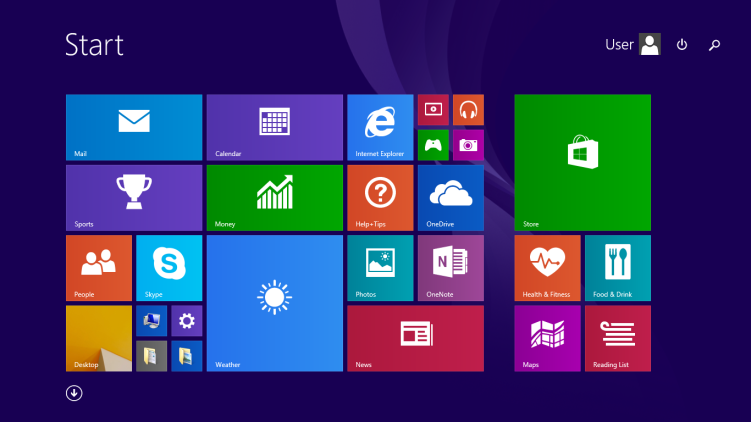
- User interface refinements: improvements to the tile-based Start screen, greater control over tile sizes and layouts, and expanded multitasking with enhanced Snap views for running multiple apps.
- Search and cloud integration: system-wide search integrated web results via Bing and tighter file and settings sync through Microsoft's cloud service, rebranded as OneDrive.
- Apps and browser: updated built-in apps and Internet Explorer 11 were included, together with improvements to the Windows Store for discovering and managing apps.
- Enterprise and security: added management and security options targeted at business deployments, plus updated support for modern authentication and device management scenarios.
History and development
Windows 8.1 was developed as a response to user and enterprise feedback about Windows 8's radical departure from the traditional desktop experience. It represents the second release in the Windows 8.x line and coincided with updates to Microsoft's server products. As a free update, it was deployed widely on consumer and commercial PCs and tablets; users could install it through the platform's update mechanisms or obtain it preinstalled on new hardware.
Usage, upgrades and support
Windows 8.1 remained a mainstream option for users who preferred the hybrid touch/desktop approach introduced in Windows 8. Microsoft promoted upgrade paths to future releases: when Windows 10 shipped, eligible Windows 8.1 systems were offered a free upgrade to that release. For lifecycle information and official guidance see Microsoft's product pages: Windows 8.x, Windows NT family, and the Windows 10 upgrade details at Windows 10. Technical notes and versioning details are summarized on Microsoft's documentation: version information.
Notable facts
Although Windows 8.1 addressed many criticisms of Windows 8, it retained the Modern (tile) environment alongside the traditional desktop, requiring users and IT departments to choose how to deploy and configure the experience. For current security and support status consult official sources such as the Microsoft support site and lifecycle pages (product support).
Author
AlegsaOnline.com Windows 8.1 — Microsoft's 2013 update to Windows 8 Leandro Alegsa
URL: https://en.alegsaonline.com/art/147939