
Windows 10 — overview, history, editions, features and support
Comprehensive encyclopedia article on Windows 10: development, editions, UI, features, security, servicing model, LTSC variants, deployment considerations and lifecycle guidance.
Windows 10 is a major operating system developed by Microsoft and released as part of the broader Windows family. Announced in September 2014 and shipped for personal devices on 29 July 2015, it was developed under the codename “Threshold” and positioned to unify experiences across device types. Official product and documentation pages provide basic orientation and edition descriptions at product overview pages.
Image gallery
5 Images


Goals and design
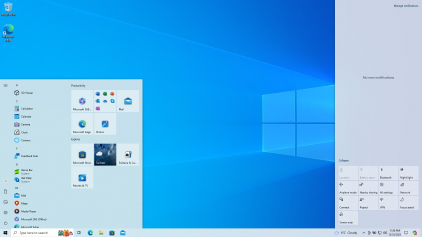
Windows 10 was designed to restore familiar desktop workflows while supporting touch and pen input on mobile and tablet hardware. The desktop Start menu returned with customizable tiles, accompanied by features such as virtual desktops, a notification Action Center, and a consolidated Settings area intended to modernize configuration and accessibility. Microsoft published guidance and interface documentation for developers and designers at user interface and accessibility resources.
Editions and variants
The operating system is offered in multiple editions for consumers, businesses and specialized devices. Typical consumer editions include Home and Pro, while Enterprise and Education editions target larger organizations with additional management capabilities. Specialized builds—known collectively as the Long-Term Servicing Channel (LTSC, formerly LTSB)—are produced for mission-critical or embedded hardware where feature churn must be minimized. For device categories and hardware considerations see guidance for personal computers, laptops, all-in-one PCs and tablets.
Platform reach and related systems
Although primarily targeted at desktop and mobile PCs, Windows 10 variants and shared components have been adapted for consoles and server products. A related platform is used on certain models of the Xbox family, and releases are coordinated in some respects with Windows Server. Embedded and IoT scenarios are supported via tailored editions and runtime components; see embedded system guidance at embedded systems resources.
Development, release cadence and versioning
Microsoft moved Windows 10 to a continuous delivery model often described as software as a service. Feature updates were published roughly twice a year, while security and maintenance patches arrived regularly. Releases are identified by a versioning scheme that encodes year and month (a YYMM style) and by build numbers. The company also collected user feedback to prioritize improvements during preview and after release.
Support lifecycle and LTSC
Windows 10 editions follow defined support policies that distinguish mainstream servicing from extended security updates. Microsoft offered a free upgrade path from prior consumer releases such as Windows 7 and Windows 8.1 for a limited period after initial availability. LTSC releases (for example, editions produced in 2016, 2019 and 2021) are intended for devices that require long-term stability and therefore receive fewer feature updates but extended security servicing. Administrators should consult official lifecycle pages and vendor statements for exact end-of-support dates and program specifics.
Security and platform features
Windows 10 introduced and consolidated a set of security technologies commonly used across organizations and consumer devices. These include built-in anti-malware components, platform protections such as Secure Boot and hardware-backed features, disk encryption options, and enterprise management controls. Microsoft publishes technical notes, deployment advice and security guidance on dedicated channels and technical blogs at technical resources.
Deployment, management and enterprise use
Enterprises and service providers manage Windows 10 through a mix of on-premises and cloud tools, update rings, and configuration profiles. Choices about deferring feature updates, using LTSC, or adopting semi-annual releases are driven by application compatibility, regulatory constraints and device lifecycles. Migration and deployment guidance, including hardware compatibility lists and recommended practices, are available from vendor portals and migration pages at migration guidance and compatibility documentation.
Reception, use cases and limitations
Windows 10 was widely adopted across consumer, educational and enterprise markets and received generally positive reviews for restoring familiar desktop elements and improving compatibility with modern hardware. Criticisms focused on update handling, telemetry and privacy settings; Microsoft responded with enhanced controls and documentation. For consumer device guidance and specific platform notes consult manufacturer resources and device setup articles such as those for smartphones and tablets.
Where to find more information
- Official product pages and documentation hubs for edition and feature summaries.
- Company documentation and support portals for lifecycle notices and downloads.
- Technical blogs and release notes for developers and IT professionals.
- Feedback and preview program information for participatory testing and issue reporting.
- Service model explanations describing update cadence and servicing channels.
- Versioning and build documentation explaining the naming scheme and how to read release identifiers.
Readers and administrators should consult the official lifecycle and support pages, product documentation, and vendor-specific notes before making deployment decisions. For detailed compatibility checks, hardware requirements and upgrade paths see manufacturer resources and administrative guides, and follow published security advisories and update guidance when planning rollouts or migrations.
Questions and answers
Q: What is Windows 10?
A: Windows 10 is a computer operating system by Microsoft that is part of the Microsoft Windows family of operating systems.
Q: When was Windows 10 announced?
A: Windows 10 was announced at a press event on 30 September 2014.
Q: When did it come out for personal computers?
A: It came out for personal computers on 29 July 2015.
Q: Was it available as a free upgrade for users who had Windows 7 or 8.1?
A: Yes, beginning on that day, Windows 10 was available as a free upgrade for users who had Windows 7 or 8.1.
Q: What type of systems can run similar programs with greater ease using Windows 10?
A: Using Windows 10 allows desktop, laptop, and all-in-one PCs, tablet computers, smartphones, and embedded systems such as the Xbox game console to run similar programs with greater ease.
Q: How often does Microsoft release updates with new features for Window 10?
A: Every half a year, Microsoft releases updates with new features for Window 10.
Q: How are version numbers expressed in builds released in each update?
A: Version numbers are expressed in builds released in each update by four-digit build number (a type of version number). The first two digits refer to the year of release and the other two digits refer to the month of release (e.g., "1903" refers to a build released in March 2019).
Related articles
Author
AlegsaOnline.com Windows 10 — overview, history, editions, features and support Leandro Alegsa
URL: https://en.alegsaonline.com/art/108501
Sources
- wincom.blob.core.windows.net : "Which Windows Version is Right For You? (pdf)"