
APTonCD — creating portable Debian/Ubuntu package repositories
APTonCD collects .deb packages already downloaded by APT and builds ISO images or discs to create removable offline repositories for installing packages on other Debian-based systems.
Overview
APTonCD is a utility for Debian-based distributions (including Ubuntu and derivatives) that collects .deb packages already downloaded by the APT package management tools and packages them into removable media. By producing an ISO image or writing to disc, APTonCD lets administrators and users install software on other machines without an Internet connection, reusing already retrieved package files.
Image gallery
1 Image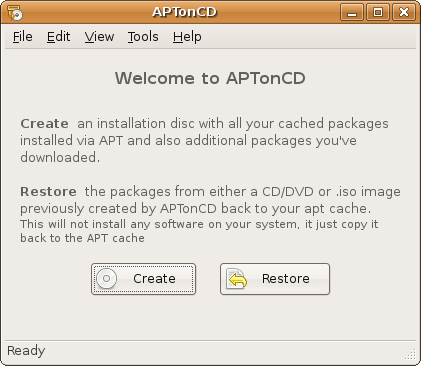
How it works
The program scans the APT package cache (where apt-get or aptitude stores retrieved .deb files) and presents a selection interface. Selected .deb files are copied into a structured repository layout and an ISO image is generated that can be burned or copied to removable storage. On a target machine the media can be mounted or added as a package source so apt can locate and install the contained packages.
Typical workflow
- On a connected machine, accumulate packages by installing or updating software normally so that .deb files are placed in the APT cache (commonly /var/cache/apt/archives).
- Run APTonCD to scan the cache, select packages or entire repositories, and build an ISO image.
- Transfer the ISO to removable media or copy it to other systems.
- On target systems, mount the media or configure it as an apt source and install packages as needed.
Use cases
- Deploying software in air-gapped or low-bandwidth environments.
- Sharing a single download among multiple machines to conserve network bandwidth.
- Backing up a set of installed packages prior to reinstalling or upgrading systems.
Compatibility and limitations
The usefulness of media created with APTonCD depends on matching the package architecture (e.g., amd64, i386) and distribution release of target systems. The generated archive contains only the .deb files present in the source cache; missing dependencies will prevent successful installation on another machine. For best results, build media from a system that uses the same release and package sources as the intended recipients.
Alternatives and related tools
APTonCD is focused on repackaging already-downloaded .deb files. Other approaches exist for offline package management: creating a local apt mirror, using apt-offline to fetch missing packages, running apt-cacher or apt-cacher-ng for networked caching, or generating repository metadata with dpkg-scanpackages and apt-ftparchive. Choose the tool that matches whether you need to collect existing files or fetch missing items from remote servers.
Security and best practices
When distributing packages, ensure recipients trust the source and that package signatures and repository metadata are handled appropriately. Verify that license and origin expectations are satisfied and avoid mixing packages from incompatible releases. Always test the created media on a representative machine before broad deployment.
Troubleshooting
Common issues include missing dependencies (resolveable by including all required .deb files), architecture mismatches, and expired or changed package indices. If packages fail to install from the media, double-check that the target system has the media configured as an apt source and that package filenames in the archive are intact.
Project status
APTonCD has been a practical solution for offline package distribution where .deb files are available locally. Users should verify current maintenance and compatibility with recent releases of their chosen distribution before relying on it for critical deployments.
Related articles
Author
AlegsaOnline.com APTonCD — creating portable Debian/Ubuntu package repositories Leandro Alegsa
URL: https://en.alegsaonline.com/art/5067
Sources
- aptoncd.sourceforge.net : "APTonCD"