
Tablet computer: portable touchscreen computers, features, history, and uses
A tablet computer is a slim, portable touchscreen device used for media, work, learning and communication; this article covers hardware, software, history, common uses and how tablets differ from laptops and smartphones.
Overview
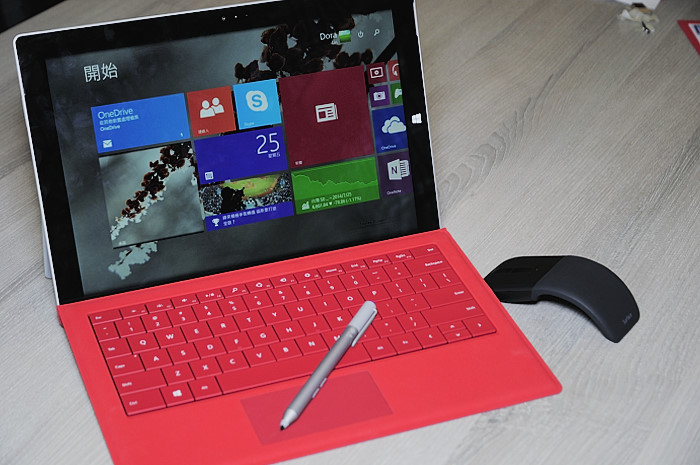
A tablet computer is a lightweight, flat computing device designed primarily for direct interaction through a touchscreen rather than a permanent physical keyboard or trackpad. Typical tablets range from about 7 to 12 inches measured diagonally, with many mainstream models near 10 inches; very large models and small phone-tablet hybrids (sometimes called phablets) extend that range. Users navigate the system with taps, swipes and multi-touch gestures, or they can add accessories such as detachable keyboards and styluses to expand functionality. For a concise definition see tablet definition and for comparisons with laptop designs consult laptop comparisons. The difference from a traditional keyboard device is discussed at keyboard differences, while touchscreen technology and multi-touch interaction are covered at touchscreen and multi-touch overview. Tablets share many interaction ideas with modern smartphones; general design trends are summarized at smartphone relationship. The phablet category and typical diagonal sizes are noted at phablet note and screen sizes.
Image gallery
10 Images



Hardware and components
Under the durable glass and lightweight chassis, tablets combine mobile processors, flash storage, battery, display, wireless radios and various sensors. Most models include Wi‑Fi capability and many support cellular data via 2G, 3G, 4G/LTE or 5G modems for internet access on the move. See connectivity options at internet access and Wi-Fi standards, and mobile network generations at mobile networks, 2G, 3G, 4G and 5G. Physical sensors such as front and rear cameras, microphones, ambient light sensors, accelerometers and gyroscopes are common; their general roles are described at sensor overview.
- Display: high-definition panels, anti-glare coatings and various display technologies (LCD, OLED) are widely available; see HD, anti-glare and display technologies.
- Audio and input: built-in microphones and cameras enable video calls and voice control; detailed information at cameras and microphones.
- Connectivity: Bluetooth is used for keyboards, headphones and printers; see Bluetooth and printer support.
- Storage: internal flash memory is common, often paired with cloud backup and synchronization services; consult flash memory and cloud backup.
Software, operating systems and apps
Tablets run operating systems designed for touch interaction or adapted desktop systems. Major tablet OS families include variants of Android, vendor-customized systems and desktop-class systems that support touch. A growing trend is dedicated tablet operating systems or tablet-optimized interfaces that emphasize apps and touch-first navigation. App ecosystems supply productivity suites, media players, creative tools and educational titles. Cloud services and synchronization keep files, contacts and settings consistent across devices; see synchronization basics at sync services and data handling at data management. Many tablets include software and hardware optimizations for streaming, reading, gaming and content creation, and they support peripherals such as styluses and external storage.
Accessories and expandability
Common accessories include active styluses for drawing and handwriting, detachable keyboards that convert a tablet into a laptop-like device, protective cases, docking stations and external displays. Peripherals may connect via Bluetooth, USB-C or proprietary connectors. When selecting accessories, compatibility with the tablet's operating system and connector types is important. Peripheral support and printing options are discussed at Bluetooth and printer support.
Origins and evolution
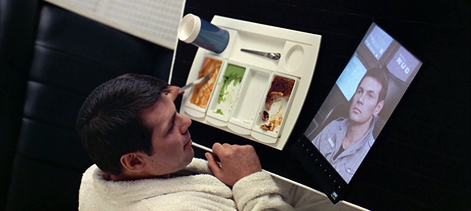
Concepts of portable, slate-like devices appear in mid-20th-century science fiction and later technical sketches; early speculative depictions are outlined at science fiction influence and timelines at 20th century milestones. Throughout the late 20th century inventors and companies experimented with various pen-based and slate computers. The modern consumer tablet market gained wide public attention following a prominent 2010 release that popularized a consumer-focused tablet form; commentary on that release is available at 2010 tablet release. Since then, manufacturers have diversified the market with low-cost models, premium professional slates and hybrid devices that blur the line with laptops.
Common uses, deployment and management
Tablets are widely used in education, healthcare, retail, field service, hospitality and personal entertainment. In classrooms they support digital textbooks, interactive lessons and assessments. In healthcare and retail they serve as portable terminals for records, point-of-sale systems and patient or customer engagement. Enterprises often manage tablets with mobile device management (MDM) tools to enforce security, deploy apps and manage updates. When evaluating tablets for deployment consider screen size and quality, processing power, available apps, battery life, weight, accessory compatibility and the vendor's update and security policy.
Comparison with laptops and smartphones
Compared with laptops, tablets typically emphasize touch input, reduced weight and battery life over raw processing power and extensive I/O. Compared with smartphones, tablets offer larger displays better suited for reading, productivity and creative work, often with similar connectivity features. Some tablets are convertible or run desktop-style multitasking to support more complex workflows, narrowing the gap with laptops.
Security and future trends
Security features on tablets commonly include device encryption, biometric authentication (fingerprint or facial recognition), secure boot sequences and regular system updates. Future trends include more powerful system-on-chip designs, improved displays (including higher refresh rates and foldable panels), tighter integration with cloud services and continued convergence between mobile and desktop environments as software and networks evolve.
For further detail on tablet specifications, connectivity and accessories consult the linked topics above such as internet access, touchscreen and sync services.


Development
Concepts and design studies for this type of device have existed since the late 1980s. One of the first devices of this type was the GRiDPad from GRiD Systems in 1989, which, however, was not able to achieve great market significance. At the beginning of their development, the devices known as Personal Digital Assistants (PDA) were mainly limited to calendar, address and task management due to the technical possibilities and the lack of broadband mobile Internet access. For a long time in the 1990s, the market was dominated by PDAs or organizers from the Palm company (such as the Palm Pilot), which were operated using a stylus and handwriting recognition.
In 2001, the SIMpad, a Microsoft tablet PC launched on the market by the German manufacturer Siemens in Switzerland, was marketed under the term Surfpad. In Germany, this device was introduced by the network operator Telekom under the name T-Sinus Pad. The name was chosen to distinguish it from mobile Internet devices without or with limited multimedia capability, e.g. mobile phones with WAP support. The booting of the operating system ends in a web browser and already loads user-specific web content into the user interface adapted for surfing the Internet during system startup. But none of these devices could hold their own on the market.
In 2010, the US manufacturer Apple launched the iPad and achieved a breakthrough for this product category with a major sales success. Numerous other manufacturers followed with similar devices, which ultimately resulted in significant market changes in the area of portable computers. In particular, sales of notebook PCs and netbooks declined significantly in favor of tablets.

Imágenes principales
The design is sometimes also referred to as a pad or surfpad. In this device class, one often finds single-chip systems with embedded operating systems. The device consists of a monolithic block, which contains the display and all other components. There are only a few interfaces for peripheral devices. Sometimes there is only one interface, which provides standard interfaces such as USB or VGA via adapters. The displays are often capacitive touchscreens, which is why the devices can only be operated with the fingers or special input pens. The manufacturer Lenovo relies on an integrated projector as an additional output device in the Yoga Tablet 2 Pro model.
Questions and answers
Q: What is a tablet computer?
A: A tablet computer is a type of computer that can be carried easily and has no physical keyboard or trackpad. It is usually controlled by using its touchscreen with multi-touch technology similar to a smartphone.
Q: How big are the screens on tablets typically?
A: The screen size of tablets can range from 7 inches (18 cm) to 12 inches (30 cm), but many have a screen size of about 10 inches (25 cm) diagonal.
Q: Can tablets access the Internet?
A: Yes, almost all tablet computers can access the Internet using Wi-Fi, and many can use mobile phone networks like 2G, 3G, 4G, and 5G.
Q: What other features do tablets have?
A: Tablets often have high definition displays with less reflection, Bluetooth radio for connecting to printers and other devices, flash memory storage, and cloud storage services for backing up information on the tablet and synchronizing data.
Q: When did science fiction start putting tablets in stories?
A: Science fiction started putting tablets in stories after the middle 20th century.
Q: When was the Apple iPad released?
A: The Apple iPad was released in 2010.
Q: What happened after the release of the Apple iPad?
A: After the release of the Apple iPad there was much attention given to it which led to other companies making and selling more tablets.
Related articles
Author
AlegsaOnline.com Tablet computer: portable touchscreen computers, features, history, and uses Leandro Alegsa
URL: https://en.alegsaonline.com/art/95806