
Tab (graphical user interface)
A GUI element that groups and switches between multiple panels or documents in a single window. Tabs improve organization, reduce clutter, and are used in browsers, editors, settings dialogs and many applications.
Overview
A tab in a graphical user interface is a control that lets a user switch between different panels, documents, or views inside a single window. Only one tab is typically active at a time; selecting a tab displays its associated content while hiding others. Tabs provide a compact, familiar way to manage multiple contexts without opening separate windows.
Image gallery
8 Images


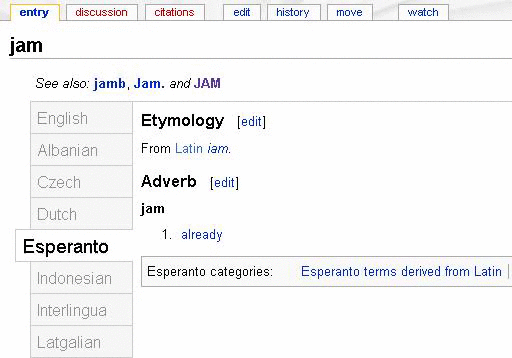


Structure and behavior
Tabs usually appear as a row (or sometimes a column) of labeled headers. Each header corresponds to a container or document. Common properties include:
- Label or icon identifying the tab's content.
- An active state showing which tab is currently selected.
- Close controls for detachable documents (often an × symbol).
- Drag-and-drop support to reorder tabs or move them to new windows.
Programmers build tabs from widgets in a toolkit or framework; accessibility and keyboard navigation are important considerations.
History and adoption
Tabs evolved from desktop metaphors such as file folders and notebooks. Early document-based systems and later web browsers popularized the pattern by allowing multiple pages to share a single window frame. Over time tabs have been adapted to many application types, from settings dialogs to integrated development environments.
Uses and examples
Tabs are widely used to reduce screen clutter and group related information. Examples include:
- Web browsers that let users open multiple pages in one window, improving navigation and task switching (web browser).
- Word processors and editors where each document can be a tab (word processor).
- Settings or preference dialogs that separate sections like General, Security, and Appearance.
Variations and notable facts
Designers vary the visual style (rounded, square, stacked) and interaction model (closable, pinned, overflow menus). Mobile interfaces often implement segmented controls or swipeable tab bars rather than classic desktop tabs. Well-implemented tabs balance discoverability, keyboard support, and the ability to manage many concurrent items.
Questions and answers
Q: What is a tab in GUI?
A: A tab in GUI is a way to switch between different controls or documents.
Q: What is the purpose of a tab in a configuration screen?
A: The purpose of a tab in a configuration screen is to switch between different controls.
Q: What is the purpose of a tab in a web browser or word processor?
A: The purpose of a tab in a web browser or word processor is to switch between different documents.
Q: Can multiple tabs be active at the same time?
A: No, only one tab can be active at a time.
Q: What do tabs do on a computer with a graphical interface?
A: Tabs on a computer with a graphical interface switch between different controls or documents.
Q: What is the benefit of having tabs in a graphical interface?
A: The benefit of having tabs in a graphical interface is that it allows for quick and easy switching between different controls or documents.
Q: Are tabs exclusive to computers with a graphical interface?
A: Tabs are primarily used on computers with a graphical interface, but can also be used to switch between different items in other contexts, such as a binder with tabs for different sections.
Related articles
Author
AlegsaOnline.com Tab (graphical user interface) Leandro Alegsa
URL: https://en.alegsaonline.com/art/95781