
Print server (printer server)
A print server connects printers to a network, accepting jobs from clients and managing queues, access, protocols and spooling for centralized printing in homes, offices and data centers.
Overview
A print server, sometimes called a printer server, is hardware or software that links one or more printers to a group of users so that print jobs can be submitted, queued, and managed centrally. A print server may be implemented on a general-purpose computer, a small dedicated device, or as a built-in function of modern network-capable printers. It provides an interface between client systems and the printing device across a local area network.
Image gallery
5 Images


How it works
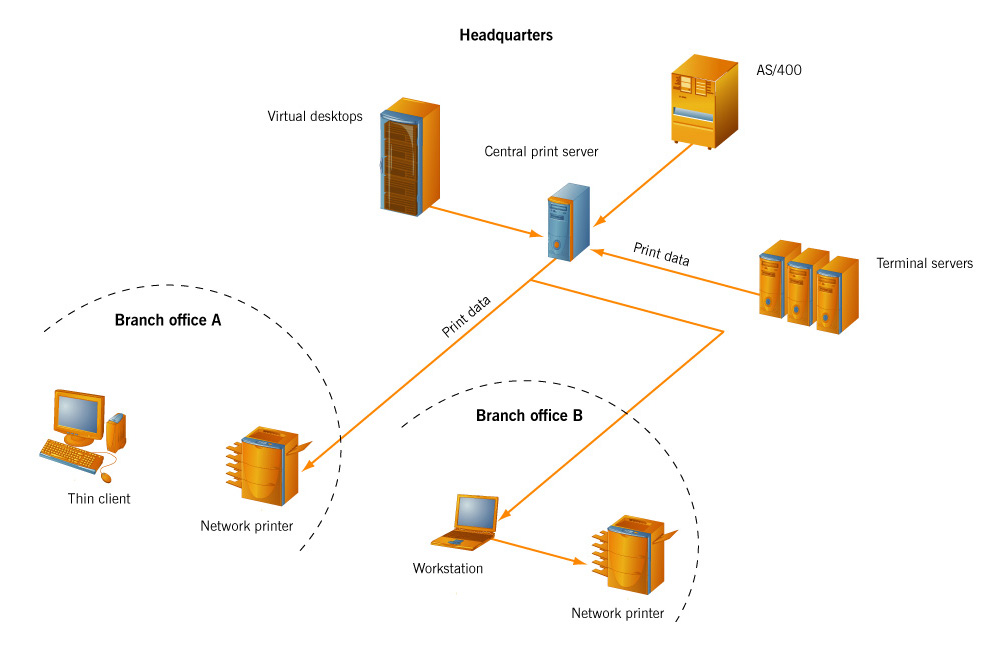
A typical print server accepts job data from client computers, stores the job temporarily (spooling), schedules it, and sends formatted output to the target printer. It often maintains queues, driver repositories, job logs and status reporting. Common network print protocols include IPP, LPD/LPR, SMB and raw TCP/IP connections; many servers translate or proxy between different protocols.
Components and types
- Software servers: services running on an operating system that manage printers and share them to network users.
- Embedded servers: network interfaces built into printers that allow direct network printing.
- Dedicated appliances: small boxes that attach to USB or parallel printers and provide Ethernet or Wi‑Fi connectivity.
- Cloud/managed services: vendors or cloud platforms that accept jobs over the internet and forward them to local printers.
History and development
In early local networks, individual machines often connected directly to single printers. As offices scaled, centralized servers and print spoolers emerged to improve efficiency and administration. Over time, standards and protocols evolved to support remote printing, authentication, driver management and error reporting. More recently, cloud printing and secure print release have added new management and security layers.
Uses, advantages and considerations
Print servers reduce the need for multiple printer connections, simplify driver distribution, enable centralized accounting and allow policies such as user quotas or duplex-only defaults. They are useful in offices, libraries, schools and production environments. Important considerations include compatibility with printer drivers, network bandwidth, single points of failure and security measures to prevent unauthorized access to sensitive documents.
Distinctions and notable facts
Do not confuse a print server with a print spooler: the spooler is the software component that queues jobs, while the server is the overall system exposing printing services to clients. Many modern printers contain their own server capabilities, reducing the need for separate hardware; however, dedicated servers still offer centralized control and integration with enterprise authentication and accounting systems.
Questions and answers
Q: What is a print server?
A: A print server is a computer or device that is connected to one or more printers and a network to accept print jobs from client computers.
Q: What does a print server do?
A: A print server accepts print jobs from client computers and then prints the jobs on the requested printer.
Q: What term is used for a print server?
A: The term used for a print server can be printer server.
Q: What type of device can be used as a print server?
A: A computer or device can be used as a print server.
Q: What type of network is a print server connected to?
A: A print server is connected to a network.
Q: Can a print server be connected to multiple printers?
A: Yes, a print server can be connected to one or more printers.
Q: What is the purpose of a print server?
A: The purpose of the print server is to manage and control print jobs sent from client computers and to send them to the requested printer.
Related articles
Author
AlegsaOnline.com Print server (printer server) Leandro Alegsa
URL: https://en.alegsaonline.com/art/79238
Sources
- networkbits.net : "Features of a Wireless Network Print server"