
AutoIt: Windows scripting and GUI automation language
AutoIt is a free Windows scripting language for automating GUI tasks, creating standalone executables and extending functionality with user-created libraries and COM or DLL calls.
AutoIt is a freeware scripting language for Microsoft Windows that focuses on automating interactions with the operating system and graphical user interfaces. It enables reliable simulation of keystrokes and mouse actions, manipulation of windows and controls, process and file management, registry operations and basic network or COM automation. Scripts may be kept as plain text for rapid editing or compiled into standalone executables to run on systems without AutoIt installed.
Image gallery
2 Images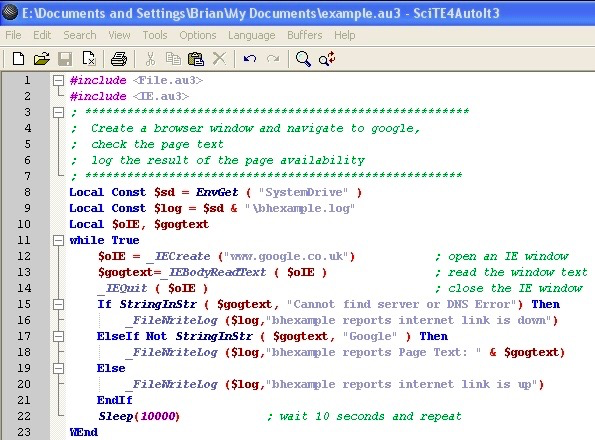

Overview
Originally developed as a simple macro tool, AutoIt evolved into a more general-purpose scripting language. Major iterations changed its syntax and capabilities: early releases were statement-driven, aimed at simulating user input, while version 3 introduced a BASIC-like syntax with variables, arrays, user-defined functions, structured flow control and greater access to Windows APIs. The language is pragmatic and task-oriented, designed to perform common desktop automation jobs with a small learning curve.
Language and syntax
AutoIt provides a compact, readable syntax influenced by BASIC. Typical elements include variables (untyped, with simple naming conventions), control constructs (if/else, select/case, while/for loops), functions and return values. Arrays and user-defined functions (UDFs) allow structured code. The standard distribution includes a comprehensive language reference and example scripts that illustrate patterns such as waiting for windows, sending input, reading and writing files, and interacting with COM objects.
Core features
- GUI and control manipulation: locate windows and controls, activate or hide windows, read or set control values and send window messages.
- Input emulation: send keystrokes, mouse movements and clicks, manage the clipboard and use control-specific commands to avoid fragile timing-based automation.
- System and file operations: start and manage processes, read/write files, enumerate folders, modify the registry and query system information.
- Interoperability: call native Windows DLLs, use COM automation, spawn external programs and parse their output.
- Compilation: convert scripts to a single executable for distribution, optionally bundling additional files.
Extensibility and UDFs
Much of AutoIt’s power comes from its ecosystem of User Defined Functions (UDFs). UDFs encapsulate specialized tasks—database access, GUI frameworks, networking, encryption, image recognition helpers and more—and can be included in projects to extend functionality. Developers can also write wrappers to call Windows APIs or third-party DLLs directly for capabilities not provided by the core language.
Development tools
The standard AutoIt package includes a SciTE-based editor and a simple compiler. The editor bundles syntax highlighting, an integrated help viewer and build commands to compile and run scripts. Many users supplement the default environment with third-party tools or editors, but the bundled toolchain offers a consistent workflow for writing, testing and packaging scripts.
Use cases
Common uses include automating installers and repetitive setup tasks, creating small utilities for power users, automating application testing steps that require GUI interactions, batch administration tasks and bridging legacy applications that lack APIs. Because scripts can be compiled, they are convenient for distribution to non-technical users or deployment in controlled environments.
Security and best practices
Compiled AutoIt executables can sometimes trigger antivirus heuristics, especially when they perform installer-like actions. To reduce false positives and improve trust, sign distributed binaries when possible, document their behavior, and follow secure coding practices: validate inputs, implement timeouts and error handling, avoid hard-coded credentials and test scripts in safe environments before production use.
Alternatives and interoperability
AutoIt is one of several tools for Windows automation. Alternatives include AutoHotkey (focused on hotkeys and lightweight automation), PowerShell (powerful for system administration and scripting but less focused on GUI manipulation) and general-purpose languages with automation libraries (for example, Python with GUI automation packages). Choice depends on task requirements: AutoIt excels at direct Windows GUI control and quick, compact scripts.
Further resources
Official documentation, community libraries and discussion forums are useful starting points:
- Official AutoIt website — downloads and start here for releases and news.
- Language reference — detailed function reference and syntax guide.
- Platform details — compatibility notes for different Windows versions.
- Automation tutorials — step-by-step guides and common patterns.
- UDF repository — community-contributed User Defined Functions and modules.
- Editor and toolchain — information about the bundled SciTE editor and compiler.
- Community forum — discussions, sample scripts and troubleshooting.
- Security and distribution notes — packaging advice and guidance to reduce false positives.
- Best practices — recommendations for robust, maintainable automation scripts.
AutoIt is best suited for administrators, testers and power users who need reliable desktop automation with a small runtime footprint. Its combination of built-in capabilities, extensible UDF ecosystem and an approachable IDE keeps it a practical choice for many Windows automation tasks.
Questions and answers
Q: What is AutoIt?
A: AutoIt is a freeware programming language for Microsoft Windows.
Q: How was AutoIt used in versions 1 and 2?
A: In versions 1 and 2, it was used to create automation scripts for Microsoft Windows programs, also known as macros.
Q: What changed in version 3 of AutoIt?
A: The scripting language in version 3 was extended to allow it to do more things, and the syntax changed to be similar to the BASIC programming language.
Q: What type of data can an AutoIt script contain?
A: An AutoIt script can contain types of data such as arrays.
Q: Can an AutoIt script be run on computers without the interpreter installed?
A: Yes, an AutoIt script can be converted into a stand-alone executable which can be run on computers that do not have the interpreter installed.
Q: Are there any extra abilities available for the language?
A: Yes, a wide range of function libraries are available known as UDFs or "User Defined Functions", some included as standard and others available from the website which add extra abilities to the language.
Q: Is there a special editor for developing with AutoIt?
A: Yes, there is a special editor based on the free SciTE editor which includes both a compiler and help text providing developers with a standard environment for development.
Related articles
Author
AlegsaOnline.com AutoIt: Windows scripting and GUI automation language Leandro Alegsa
URL: https://en.alegsaonline.com/art/7608
Sources
- autoitscript.com : "AutoIt Downloads"
- autoitscript.com : Reply by Jon (AutoIt creator) to a forum topic discussing correct pronunciation
- autoitscript.com : autoitscript.com/wiki/User_Defined_Functions
- autoitobject.origo.ethz.ch : "AutoItObject, a library to use object-oriented design in autoit"
- autoitscript.com : "AutoIt History"
- autoitscript.com : AutoIt v3.3.14.3 Released Feb 2, 2018
- autoitscript.com : "Licensing Opinions"
- autoitscript.com : "License" · web.archive.org
- autohotkey.com : Chris Mallet (author of AutoHotkey)'s post