
Overhead projector: design, history, and educational uses
Overview of the overhead projector (OHP): how it works, key parts, historical development, classroom and meeting uses, and reasons it was largely superseded by digital devices.
An overhead projector (often abbreviated OHP) is an optical device that casts enlarged images of transparencies or live materials onto a screen or wall so an audience can view them. Initially popular in classrooms and meeting rooms, the OHP projects content placed on a clear sheet or displayed from a source placed on its glass stage. Modern references also describe ways to link an OHP to a computer for hybrid displays: image sources and computer or laptop connections have been adapted in some systems to combine analog transparencies with digital files.
Image gallery
3 Images

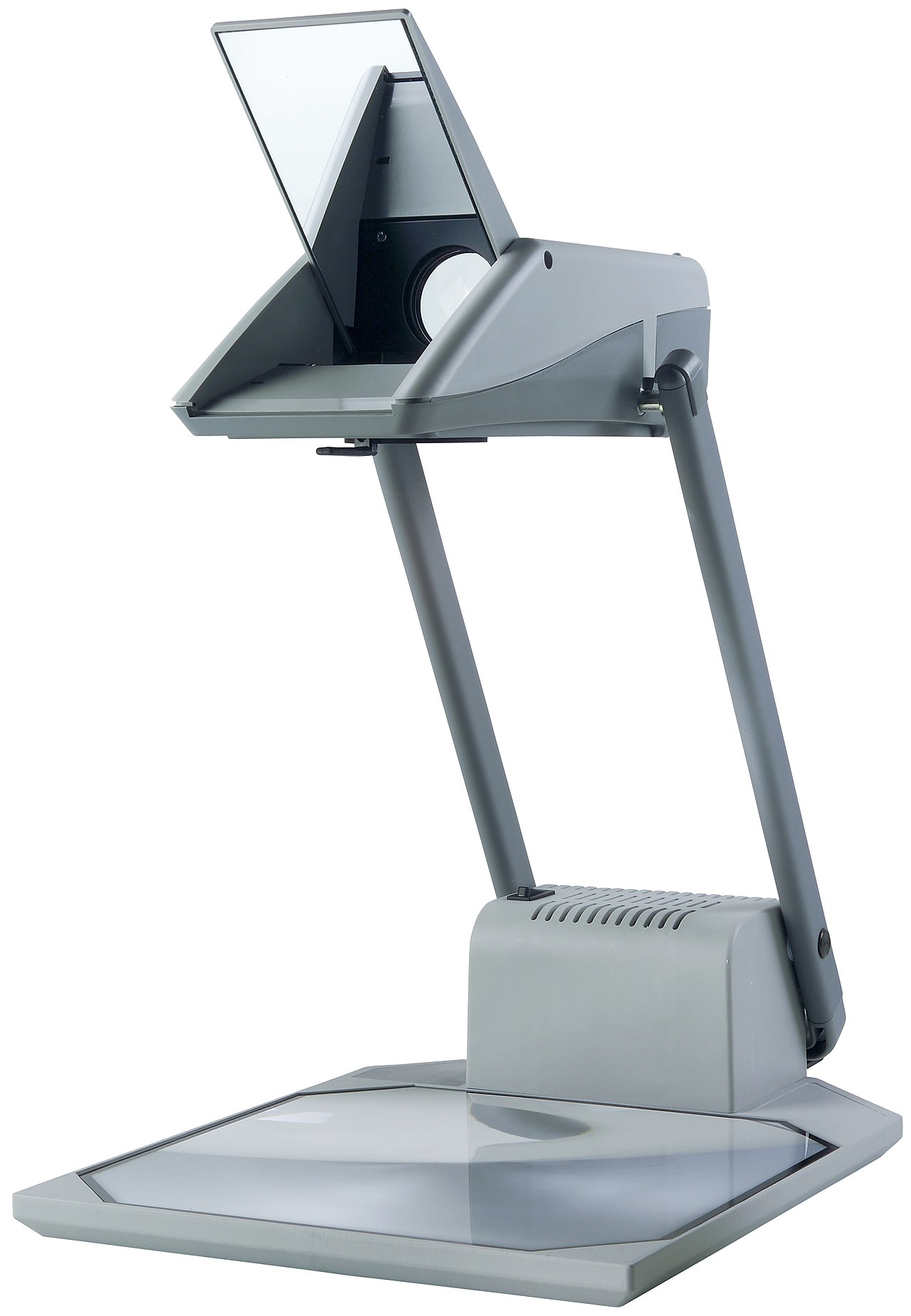
How it works and main components
The basic projector contains a bright lamp inside a box, a transparent glass stage on top, and a projecting head with a mirror and lens system that directs an enlarged image forward. Typical components include a cooling fan, a focusing lens, and a plastic or metal frame holding the projecting arm and mirror. Transparencies printed or written upon are laid on the glass, and light passes up through the transparency, through the lens, then reflects off the mirror to the screen. Simpler OHPs are purely optical; later models sometimes added ports or adapters to accept live video or digital feeds so presenters could combine analog and digital content.
History and development
Predecessors to the overhead projector include magic lanterns and other early projection devices. OHPs became widely used in classrooms and corporate settings in the mid-20th century because they were portable, easy to operate, and allowed instructors to prepare reusable transparencies. They earned colloquial nicknames in some places and were a classroom staple for decades until the spread of digital projectors, document cameras, and interactive displays. For use cases and lesson planning, many educators archived transparencies for repeat lessons or adapted slides into overhead transparencies and handouts for presentations and paper-based materials for students.
Uses, advantages and limitations
Advantages of an OHP include immediate, low-tech projection; the ability to write or annotate in real time on a transparency; and low maintenance compared with early film or slide systems. Typical uses included classroom instruction, training sessions, and small conference talks in conference rooms. Limitations became apparent as digital technologies matured: OHPs cannot easily play video files or interactive media without adapters, and they rely on physical transparencies rather than computer files. Newer tools such as interactive whiteboards, document cameras and direct digital projection allow presenters to display video, annotate stored documents, and fetch content from a computer file. Still, many instructors appreciated the OHP for enabling the presenter to write live while keeping the audience focused on a single visible surface.
Typical features and care
- Glass stage and transparency holder for placing sheets
- High-intensity lamp enclosed in the base
- Projection head with mirror and focusing controls
- Cooling system, often a fan, to prevent overheating
Care involves replacing bulbs when dim, keeping optics clean, and storing transparencies flat to avoid wrinkles. Some modern projects and museums preserve older OHPs as examples of educational technology evolution, while hybrid setups explore connecting OHP optics with technological devices to extend their usefulness.
Notable facts and distinctions
Although largely supplanted by digital alternatives, the overhead projector influenced classroom strategies (for example, the routine of preparing reusable visuals) and vocabulary around projection. It enabled low-cost, interactive instruction long before inexpensive digital displays were common. The name and regional nicknames varied; in some historical or literary references the device or idea of a projecting table has been likened to ceremonial or dramatic imagery. For more technical or historical details, consult specialized sources and archives: image sources, institutional collections, or technical manuals provide deeper diagrams and specifications.
For additional reading and resources, educators and technicians often consult manufacturer guides, classroom technology help pages, or digitization projects that document the shift from analog overheads to modern digital presentation workflows. Useful starting points include manufacturer manuals and educational technology overviews: equipment parts references, historical accounts, and how-to maintenance guides archived by schools and libraries.
Related links: computer, laptop, presentation, paper, students, technological, plastic frame, fan, conference rooms, interactive whiteboards, presenter, video, computer file.
Questions and answers
Q: What is an overhead projector (OHP)?
A: An overhead projector (OHP) is a device that projects images from either a computer/laptop or images created in real time.
Q: Where were overhead projectors commonly used?
A: Overhead projectors were often used in classrooms to showcase presentations on paper for a group of students to view.
Q: How have overhead projectors evolved over time?
A: Overhead projectors have evolved to project things on technological devices, and now have a plastic frame and fan that keeps the machine cool when it is used for long periods of time.
Q: What are some newer technologies that have replaced overhead projectors in classrooms and conference rooms?
A: Newer technologies such as document cameras and interactive whiteboards have replaced overhead projectors in classrooms and conference rooms.
Q: Why is the device sometimes called a "Belshazzar"?
A: The device is sometimes called a "Belshazzar" after Belshazzar's feast.
Q: What is the purpose of the plastic frame on top of the projector?
A: The plastic frame on top of the projector is used to hold the materials being projected onto the screen.
Q: What is the purpose of the fan on the projector?
A: The fan on the projector keeps the machine cool so that it won't overheat when used for long periods of time.
Tags
Related articles
Author
AlegsaOnline.com Overhead projector: design, history, and educational uses Leandro Alegsa
URL: https://en.alegsaonline.com/art/73722