
HTTP cookie: definition, structure, uses, privacy and security
A concise reference on HTTP cookies: what they are, how they work, common types and attributes, typical uses, privacy and security issues, browser controls and alternatives.
An HTTP cookie (commonly called a cookie) is a small piece of text data that a web server asks a browser to store and return with subsequent requests. Cookies let websites remember stateful information about a user’s visit — for example, that a user is logged in, what items are in a shopping cart, or which language a user prefers. They are not executable code; cookies are simply name=value data with optional attributes that control scope and lifetime.
Image gallery
1 Image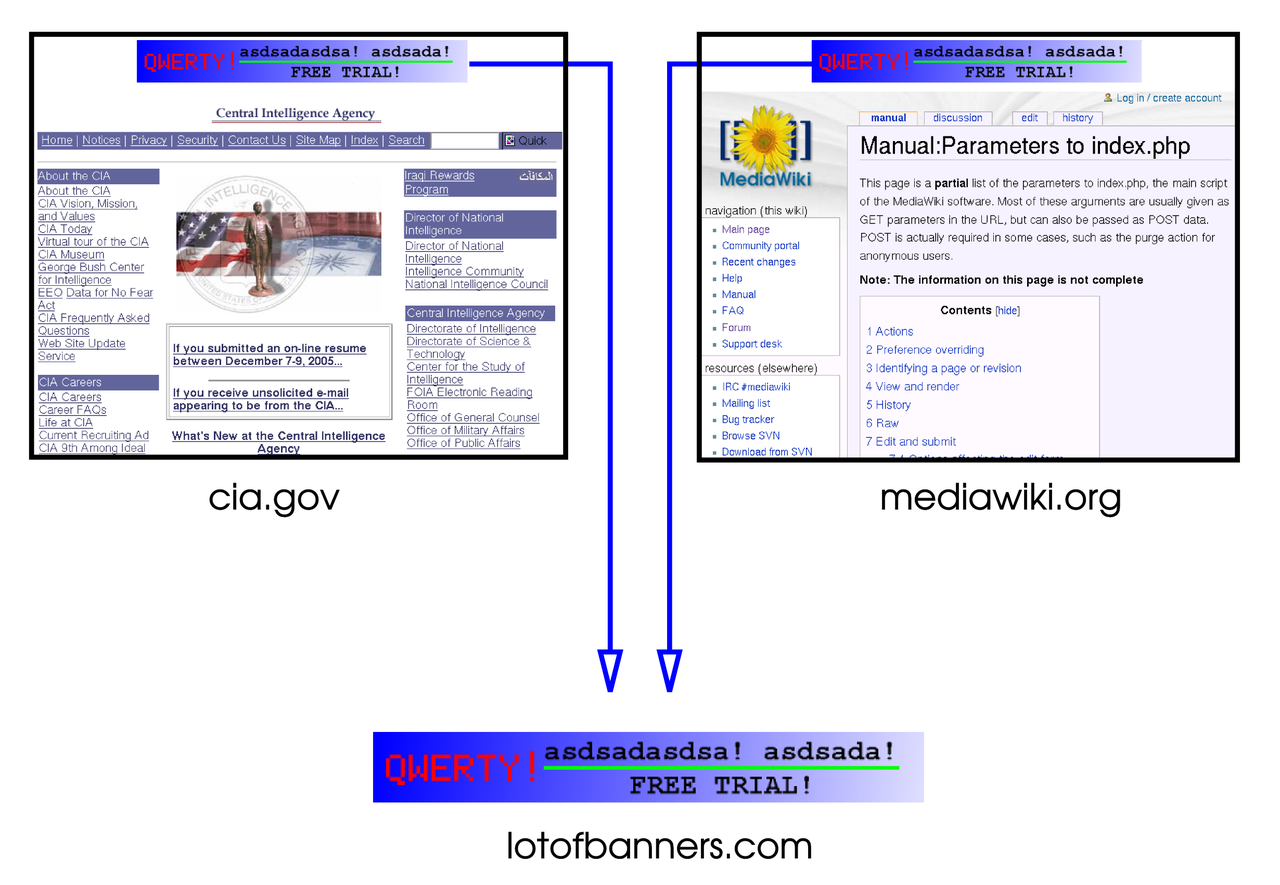
Structure and delivery
Cookies are created by a web server sending a Set-Cookie header in an HTTP response; the browser stores the cookie and includes it in later requests to matching origins via the Cookie header. A cookie record typically contains a name and value plus optional attributes such as Domain, Path, Expires or Max-Age (lifetime), Secure (send only over HTTPS), HttpOnly (not accessible to JavaScript), and SameSite (controls cross-site sending). These attributes determine which requests carry the cookie and how long it persists.
Common types and examples
- Session cookies are temporary and usually removed when the browser closes. They are used for short-lived state, such as an in-progress checkout session.
- Persistent cookies have an expiration date and remain between sessions; they power "remember me" logins and user preference storage.
- First-party vs third-party cookies distinguishes the site setting the cookie from other domains embedded on a page; third-party cookies are often used for analytics and advertising.
Typical uses include authentication, personalization, shopping cart persistence, A/B testing, analytics, and remembering form entries. For example, an online store may set a cookie to hold a temporary cart identifier, while an authentication cookie identifies a logged-in user without re-entering credentials.
Privacy, tracking and legal context
Because cookies can be used to correlate browsing across pages and visits, they have privacy implications. Advertising and analytics providers have historically used third-party cookies to build cross-site profiles. In response, regulators and browser vendors have taken steps to increase transparency and give users control. Laws and regulations in many jurisdictions require disclosure and consent for certain tracking, and major browsers increasingly limit or phase out unobtusive third-party cookies to reduce cross-site tracking.
Security considerations
Cookies can be protected using attributes: Secure prevents transmission over unencrypted HTTP, and HttpOnly prevents access from client-side scripts, mitigating some cross-site scripting (XSS) risks. However, cookies are also relevant to cross-site request forgery (CSRF) because browsers automatically send cookies with requests; site operators must combine cookie attributes with anti-CSRF tokens, SameSite settings, and careful server-side checks to reduce risk.
Browser controls and alternatives
Most browsers provide settings to block or restrict cookies per site, clear stored cookies, and block third-party cookies. Users can also use private or incognito modes to avoid persistent storage. Alternatives to cookies for client-side storage include localStorage, sessionStorage, and token-based approaches (such as bearer tokens in headers), but each has different security and privacy trade-offs. Server-side sessions store state on the server and keep only a short session identifier in a cookie.
Further reading and standards
For protocol details and recommended practices see technical descriptions and standards. Standards explain the Set-Cookie and Cookie headers, recommended attributes, and evolving specifications that address modern privacy and security requirements. For introductory material and technical references, consult resources linked here: cookie basics, cookie syntax, privacy guidance, browser documentation, developer guides, shopping cart examples, tracking concerns, legal frameworks, security analysis, and alternatives and best practices.
Cookies remain a foundational web mechanism for preserving state across requests. Understanding their attributes, uses, and limitations helps developers implement functionality while respecting user privacy and security.
Questions and answers
Q: What is an HTTP cookie?
A: An HTTP cookie is a simple computer file made of text that stores information used by websites to personalise the experience when using a website.
Q: How does a website use cookies?
A: A website can use the information stored in cookies to find out if someone has visited a website before and record data about what they did. When someone is using a computer to browse a website, a personalised cookie file can be sent from the website’s server to the person’s computer and stored in their web browser. The website can then send a message to the person’s browser asking if there is already an existing cookie from them, which it can then use for previous activity tracking.
Q: What are some examples of how cookies are used?
A: Examples of how cookies are used include shopping carts, automatic login and remembering which advertisements have already been shown.
Q: Why have laws been made regarding Internet privacy?
A: Laws have been made in some countries regarding Internet privacy because cookies can be used to track browsing behavior, which could potentially violate people's privacy rights.
Q: Are cookies programs or viruses?
A: No, cookies are not programs or viruses; they are simply pieces of data that cannot do much on their own. They are often mistakenly called spyware or viruses but this is incorrect.
Q: Can users choose whether or not to accept cookies?
A: Yes, most web browsers allow users to choose whether or not they want to accept cookies; however, if they do not allow them some websites may become unusable as certain features such as shopping baskets require them for operation.
Related articles
Author
AlegsaOnline.com HTTP cookie: definition, structure, uses, privacy and security Leandro Alegsa
URL: https://en.alegsaonline.com/art/45478