
Flight Information Display System (FIDS)
Overview of airport Flight Information Display Systems: how they work, common components and fields, historical development, operational uses, challenges, and emerging trends.
Overview
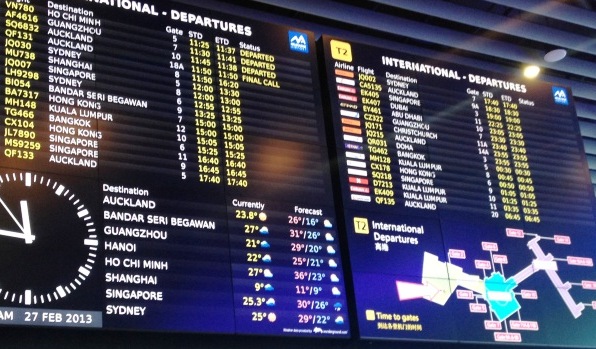
A Flight Information Display System (FIDS) is the set of hardware and software used at airports and other transport hubs to present real-time information about flights to passengers, staff, and visitors. A FIDS aggregates scheduled and operational data and shows it on public screens, websites and mobile apps so people know arrival and departure times, gates, check-in areas and current status updates such as "Boarding" or "Delayed." While the appearance and capabilities vary, every FIDS serves the same purpose: keep travelers informed and help ground operations run smoothly.
Image gallery
5 Images


Components and data flow
Modern FIDS are fed by several back-end systems. Typical inputs include the Airport Operational Database (AODB), airline departure control systems, flight plans and aircraft tracking feeds. The FIDS middleware validates and formats these inputs, then distributes them to display controllers and digital signage. Data exchange may use industry protocols and message formats; system administrators often integrate third-party feeds and remote management tools for reliability and redundancy.
Typical display fields and presentation
FIDS layouts vary, but most show consistent columns and elements that passengers expect. Common items shown on each row include:
- Flight number (sometimes multiple numbers for code-shared services).
- Airline and carrier logo or abbreviation.
- Origin or destination city and terminal information.
- Scheduled and estimated times for departure or arrival.
- Gate or stand assignment and any changes.
- Check-in counters or airline check-in area.
- Status labels: On time, Delayed, Boarding, Landed, Cancelled, etc.
Because of code sharing and airline alliances, the same physical flight can be listed under several flight numbers. Rows are typically sorted by time but can also be filtered by airline, destination or terminal on dedicated displays.
History and evolution
Early FIDS used mechanical split-flap boards and static lighted signs. With electronic displays and video walls, airports gained the ability to show richer, multilingual information and to update screens instantly. Integration with mobile apps and web services later extended FIDS output beyond airport screens to personalized notifications and wayfinding tools.
Uses, operational importance and challenges
FIDS serve travelers, curbside pick-up, ground handlers and security personnel. They reduce confusion, streamline boarding, and help staff manage gate assignments and baggage handling. Challenges include keeping data synchronized across multiple systems, handling frequent schedule changes, resolving errors caused by code sharing, and ensuring accessibility for passengers with visual or hearing impairments. Clear human-centered design and robust monitoring are essential to avoid misinformation during irregular operations.
Trends, distinctions and further resources
Current trends include cloud-hosted FIDS, personalized passenger displays on smartphones, touch-enabled kiosks, and richer integrations with airport operations for predictive gate and baggage assignments. FIDS may be single-terminal installations or scaled enterprise systems covering an entire airport campus; some operators run airline-specific displays in lounges or check-in halls.
For technical specifications, integration guidance and vendor materials, see the following resources:
- A technical overview
- Data integration practices
- Terminal-specific implementations
- Passenger information requirements
- Mechanical display history
- Electronic signage technologies
- Video wall and screen guides
- Airline-specific solutions
- User experience in travel
- Flight numbering conventions
- Airline branding on displays
- City and routing displays
- Aircraft and operational identifiers
- Multi-leg and transfer presentations
- Status message standards
- Example code-share practices
- Dual-listed flight examples
Reliable FIDS contribute to smoother passenger journeys and more efficient airport operations. Well-designed systems prioritize accuracy, accessibility, and timely updates so that staff and travelers can make informed decisions in a fast-changing environment.
Questions and answers
Q: What is a Flight Information Display System (FIDS)?
A: A FIDS is a computer system in airports that provides passengers with information about arrivals and departures as they happen.
Q: How does the FIDS help passengers?
A: The FIDS helps passengers during air travel and people who want to pick-up passengers after the flight by providing them with information such as airline name/logo, city of origin or destination, gate number, check-in counter numbers, status of the flight, etc.
Q: What kind of information can be found on an FIDS?
A: An FIDS can show information such as airline name/logo and/or its IATA or ICAO name, city where the aircraft first came from or is going to, time of take-off or landing (which may change if the plane is late), gate number, check-in counter numbers or the name of the airline in charge of check-in, and status of the flight.
Q: Are there different kinds of FID systems for large airports?
A: Yes, in large airports there is usually a separate FID system for each terminal and sometimes even for each major airline.
Q: How are lines sorted on an FID system?
A: Lines on an FID system can be sorted by time, airline name or city.
Q: What happens when flights have code sharing?
A: When flights have code sharing it means that one single flight may be shown with multiple different flight numbers - for example one flight could use LH474 and AC9099 even though only one aircraft is doing both flights.
Related articles
Author
AlegsaOnline.com Flight Information Display System (FIDS) Leandro Alegsa
URL: https://en.alegsaonline.com/art/35115