
Visual Basic: Microsoft's event-driven RAD language for Windows
Visual Basic (VB) is Microsoft's event-driven dialect of BASIC designed to simplify Windows application development, spawning VBA and VB.NET and shaping rapid application development practices.
Overview
Visual Basic (often abbreviated VB) is a family of programming languages and an integrated development environment (IDE) created by Microsoft to simplify the creation of graphical applications for the Windows platform. It evolved from the BASIC tradition, emphasising readable, English-like syntax and rapid application development through visual form design and an event-driven programming model. For official product summaries and resources see product information and historical company material at Microsoft pages. Introductory tutorials and learning sites provide many beginner-friendly guides such as educational links.
Image gallery
5 Images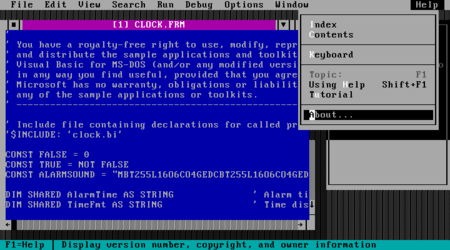


History and editions
Microsoft introduced Visual Basic in the early 1990s to give developers an easier way to assemble Windows user interfaces and associated logic. Early releases focused on interactive development: writing code and testing it immediately. Over time the family expanded into variants and related products. Visual Basic for Applications (VBA) embedded the language inside host applications to provide scripting and automation. Later, Microsoft redesigned the language for the managed .NET runtime as Visual Basic .NET (often called VB.NET), aligning it with the Common Language Runtime and modern libraries. For timelines and version notes see historical overview and version notes.
Language characteristics
VB is designed to be approachable for newcomers while supporting professional development tasks. Key characteristics include:
- A readable, high-level syntax derived from BASIC that reduces boilerplate code.
- An event-driven model where code responds to user interactions (mouse clicks, keyboard events, timers).
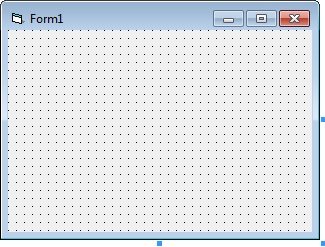
- Integrated visual form designers that let developers position controls, set properties and wire event handlers visually.
- Support for libraries, COM components and third-party controls to extend user interface and application capabilities.
Runtime, compilation and interoperability
Historically, many Visual Basic editions used a runtime or interpreter to execute code quickly during development; final projects could be packaged into executables or components that depended on a runtime. Visual Basic environments have offered both interpreted modes and compilation paths depending on the version. Interoperability with other Windows technologies was a strong focus: COM and ActiveX components could be consumed from VB, and later VB.NET programs interact with the .NET class libraries. Developer and technical reference materials covering runtime and interoperability are available in archived SDKs and current developer portals at developer resources and language references.
Common uses
Visual Basic has been widely adopted for business applications, internal tools, prototypes and educational projects because it enables quick assembly of forms-based applications. Typical uses include data-entry interfaces, small utilities, database front ends, and automation scripts (notably when used as VBA inside productivity software). The language integrates with printing, simple graphics and common data access technologies, making it suitable for a broad range of line-of-business scenarios. Practical getting-started materials and sample projects can be found at many learning portals, for example getting started guides.
Criticism, limitations and legacy
Visual Basic has been praised for lowering the barrier to Windows programming, but it has also drawn criticism. Common criticisms include the tendency to encourage rapid but sometimes fragile or hard-to-maintain designs, limited expressiveness compared with some strongly typed languages, and dependence on platform-specific runtimes in older editions. As technology shifted, Microsoft addressed many concerns by moving the language to the managed .NET platform, which brought better tooling, stronger libraries and improved type safety for modern development.
Impact and continued relevance
VB influenced the proliferation of rapid application development (RAD) tools in the 1990s and early 2000s. Its embedded variant, VBA, remains widely used for automating tasks in office suites and other host applications. Although many new projects use contemporary languages and frameworks, numerous legacy applications written in classic VB or VBA remain in active use within organizations and are maintained by teams familiar with the environment. Concepts from Visual Basic—visual designers, event-driven UI code, and accessible syntax—continue to inform modern development tools.
Learning and migration
Beginners often choose Visual Basic for its approachable syntax and immediate visual feedback from form designers. For teams modernising older VB code, common strategies include refactoring logic into libraries, migrating business logic to newer platforms, or porting to VB.NET and later to language alternatives on current runtimes. Comprehensive learning resources, community forums and archived documentation help developers understand migration paths and best practices; see referenced developer sites and historical material for detailed guidance.
Questions and answers
Q: What is Visual Basic?
A: Visual Basic is a programming language developed by Microsoft for their operating system Windows.
Q: Is BASIC language easier to read than other languages?
A: Yes, BASIC language is said to be easier to read than other languages.
Q: Is Visual Basic a high-level programming language?
A: Yes, Visual Basic is a widely understood high-level programming language.
Q: Is Visual Basic an interpreted language?
A: Yes, Visual Basic is an interpreted language.
Q: Can code be run immediately after being written in Visual Basic?
A: Yes, code can be run immediately after being written in Visual Basic.
Q: Can Visual Basic code be compiled into an .exe file?
A: Yes, once the code is working, it can be compiled into an .exe file so that it will run on all modern Windows computers.
Q: Can Visual Basic run on operating systems other than Windows?
A: No, Visual Basic will not run on operating systems other than Windows and on machines with non-Intel compatible processors.
Author
AlegsaOnline.com Visual Basic: Microsoft's event-driven RAD language for Windows Leandro Alegsa
URL: https://en.alegsaonline.com/art/105636
Sources
- msdn.microsoft.com : "C++ and Visual Basic - a Short (and Partial) History" · web.archive.org
- forestmoon.com : "The Birth of Visual Basic"
- max-visual-basic.com : "History of Visual Basic"
- vb6.us : "How Microsoft Killed Its Own illegitimate Child"
- insteptech.com : "What's new in VB6?"
- msdn.microsoft.com : "Support Statement for Visual Basic 6.0 on Windows Vista, Windows Server 2008 and Windows 7"
- msdn2.microsoft.com : "Product Family Life Cycle Guidelines for Visual Basic 6.0"
- classicvb.org : "Petition to Microsoft"
- infoq.com : "Visual Basic 6.0 to be Supported on Windows 7 | InfoQ"
- theregister.co.uk : "MS Anti-Spyware built on MS Abandonware | The Register"
- winsupersite.com : "Paul Thurrott's SuperSite for Windows: Windows Defender Beta 2 Review"
- msdn.microsoft.com : "Support Statement for Visual Basic 6.0 on Windows Vista, Windows Server 2008, Windows 7, Windows 8 and Windows 8.1, Windows Server 2012, and Windows 10"