
USB flash drive
Small, removable storage device using flash memory and a Universal Serial Bus interface; used for file transfer, backups, bootable systems and portable applications.
A USB flash drive is a compact, removable storage device that connects to a host by a USB interface. The interface is universally known as the Universal Serial Bus, while the non-volatile storage inside is a form of solid-state flash memory. Commonly called a thumbdrive, pendrive, jump drive or simply USB, these devices are designed for easy transport and quick exchange of digital information.
Image gallery
10 Images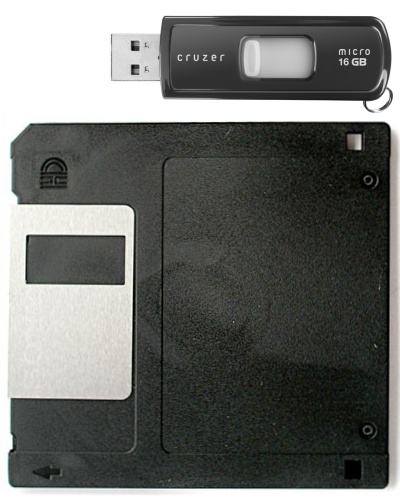




Design and main components
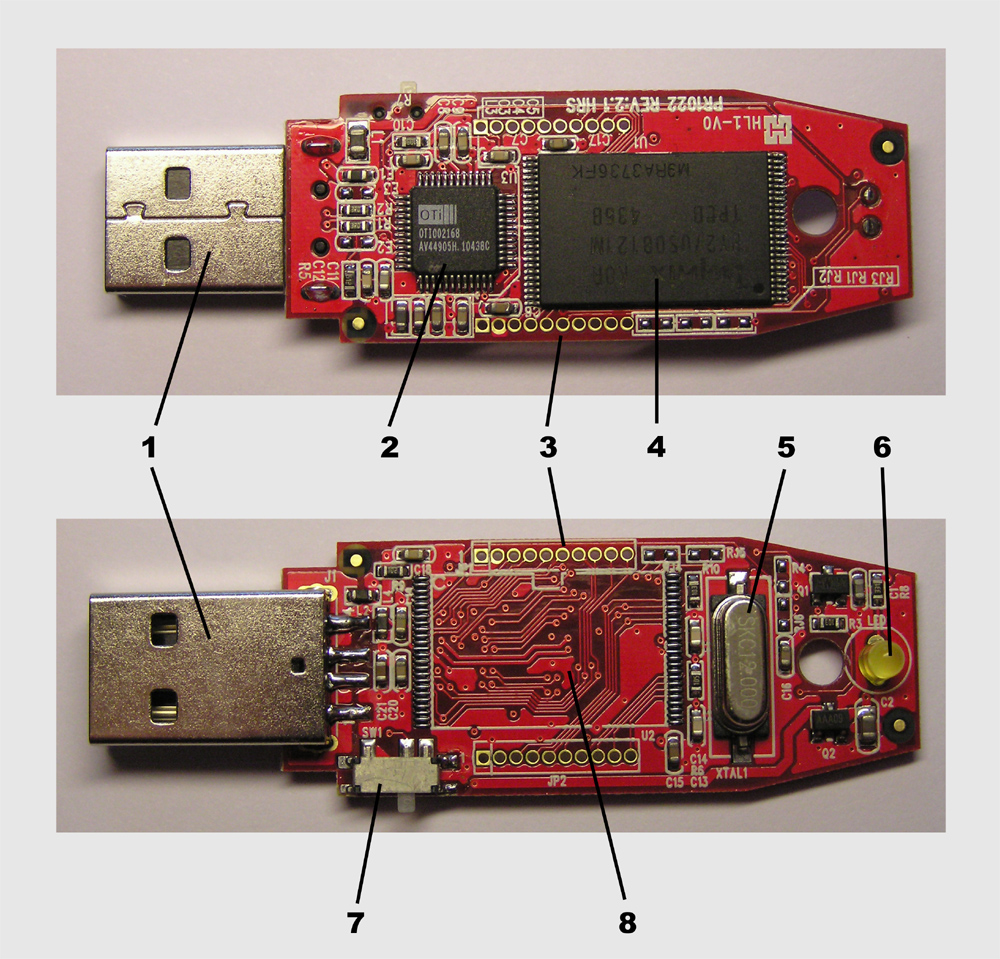
Physically a flash drive usually contains a small printed circuit board with a NAND flash memory chip and a controller that handles data transfer and wear management. The device terminates in a plug that matches the host connector (USB-A, USB-C or legacy micro variants). Casing materials range from plastic to metal and sometimes include features such as a retractable connector, cap, or keyring hole. Many models add security features like hardware encryption or a PIN-protected interface.
Typical uses
USB flash drives are used for simple file transfer and short-term storage between computers and other compatible devices. They are often used to:
- Move or share files and media quickly between machines and people (share data).
- Deliver installers or run portable applications and diagnostics.
- Create bootable media for installing operating systems or repairing systems.
- Store backups, encryption keys, or act as hardware dongles for software licensing.
They can be read by a variety of consumer devices, including personal computers, some DVD players, game consoles, digital audio players and digital picture frames.
History and capacity growth
Early commercial USB flash drives introduced a simple, durable alternative to removable magnetic media. Initial models offered small capacities (early units were around 8 megabytes), but storage density rose rapidly. By the 2010s, models of hundreds of gigabytes became available; for example, 256 gigabyte drives were on the market and larger capacities continued to appear, eventually reaching terabyte-class products. As USB flash drives became more affordable and capacious, older removable media such as floppy disks largely fell out of use in many contexts (floppy disks).
Performance, limits and differences from other drives
Performance depends on the flash quality, controller, and USB version (USB 2.0, USB 3.x). Newer USB standards and controllers deliver substantially higher sequential and random transfer rates than older ones. Despite their durability—no moving parts—flash drives have a finite number of write/erase cycles and use techniques such as wear leveling to extend usable life. They differ from external solid-state drives (SSDs) and hard drives mainly in form factor, controller complexity, endurance and often lower sustained speeds and reliability guarantees.
Practical considerations and best practices
When using a flash drive, common recommendations include keeping backups of important data, using a secure file system or encryption for sensitive files, and following the host operating system's safe-eject procedure to avoid data corruption. Flash drives are convenient and ubiquitous, but they are also a common vector for malware and misplacement—treat them like any other portable storage with appropriate security and handling precautions.
For more technical background and comparisons, consult resources that explain the USB standard, flash memory architectures and file system choices: USB overview, flash memory basics, and storage unit explanations such as megabyte and gigabyte.
Examples of device compatibility and common uses are described on many consumer guides and product pages for computers, media players and consumer electronics. See entries covering media compatibility (DVD players), data sharing (file transfer), and historical context on removable media such as floppy disks and modern digital storage.
Questions and answers
Q: What is a USB flash drive?
A: A USB flash drive is a small device used to store digital information by using flash memory to store files. It can be attached to a USB port and provides a certain amount of storage space.
Q: What are some common devices that can use USB flash drives?
A: Some common devices that can use USB flash drives include computers, DVD players, video game consoles, music players, and digital picture frames.
Q: Why are they called "flash drives"?
A: They are called "flash drives" because they use flash memory to store files.
Q: What is flash memory?
A: Flash memory is a type of computer chip used to store digital information.
Q: What are some other names for a flash drive?
A: Some other common names for a flash drive include jumpdrive, pendrive, thumbdrive, or simply USB.
Q: What are some advantages of using USB flash drives over other portable storage devices?
A: Some advantages of using USB flash drives over other portable storage devices include their small size, ruggedness, fast data reading capability, and ability to store more data than floppy disks.
Q: Why has the use of floppy disks become obsolete?
A: The use of floppy disks has become obsolete when the price of USBs became cheaper and USBs offered more storage space and faster data reading capabilities.
Related articles
Author
AlegsaOnline.com USB flash drive Leandro Alegsa
URL: https://en.alegsaonline.com/art/103659
Sources
- commons.wikimedia.org : USB flash drives
- fmqb.com : CHR – Available for Airplay
- hillsong.com : "PART ONE/// WITH HEARTS AS ONE USB Wristband"
- kingmaxdigi.com : "Kingmax Super Stick"
- youtube.com : testing removable media
- bress.net : "How Long Does a Flash Drive Last? - Josh's Blog"
- corsairmemory.com : corsairmemory.com/_faq/FAQ_flash_drive_wear_leveling.pdf
- linux-usb.sourceforge.net : "Mass Storage Devices"